
Short answer: the HP Sprocket 2×3 is the best photo printer for home use if your prints are for journals, planners and gifts, and the KODAK Dock Plus wins if you want genuine 4×6 borderless photos at home. The three variables that decide everything are maximum print size, ink system and how many photos you actually print each month.
Almost every home photo printer decision goes wrong in the same way. People pick on headline resolution or a sticker price, then discover the running cost or the print size does not match what they actually do on a Sunday afternoon. We went through ten of the strongest options on the market and sorted them by the things that matter after the box is open.
What follows is a full roundup covering phone-first portable printers, desktop dye-sublimation machines and traditional inkjets, including the refillable tank model that finally makes large prints cheap. Every pick includes an honest look at who it suits and who should skip it, and we have updated the guide for 2026.
If you are new to this, the fastest way to get your bearings is our guide to 8 Best Racing Seats for Home Arcade Setups, which covers the same kind of decision most people get wrong: the spec sheet looks identical and the real difference shows up after a month of use.
Index Table of Contents
- Top 3 Photo Printers for Home Use in 2026
- All 10 Photo Printers Compared in 2026
- 1. HP Sprocket 2×3 – The Best Photo Printer for Home Use Overall
- HP Sprocket 2×3 Instant Smartphone Photo Printer – Portable Color Wireless Mobile Printer – Zink Sticky-Back Photos – Print from Compatible iOS & Android Devices with Bluetooth w/Fun App – Purple
- Specification
- Pros
- Cons
- What the Sprocket does better than the alternatives
- Where the Sprocket falls short
- 2. KODAK Step Instant – The Best Low-Cost Way to Start Printing
- KODAK Step Instant Smartphone Photo Printer, Portable Mini Color Wireless Mobile Printer, Zink 2×3” (5.1×7.5 cm) Sticky-Back Photos, Bluetooth Compatible with iOS & Android Devices, Editing App, White
- Specification
- Pros
- Cons
- What works well about the KODAK Step
- Where the KODAK Step is the wrong pick
- 3. KODAK Dock Plus – The Best Printer for True 4×6 Photos at Home
- KODAK Dock Plus 4×6 Photo Printer, Smartphone Docking, 4PASS, 50 Sheets
- Specification
- Pros
- Cons
- Why the Dock Plus suits most households
- Where the Dock Plus frustrates buyers
- 4. KODAK Mini 2 Retro – The Best Portable Printer for Travel and Events
- KODAK Mini 2 Retro 2×3 Portable Photo Printer, 4PASS, 38 Sheets, White
- Specification
- Pros
- Cons
- What makes it better than the ZINK portables
- Where the Mini 2 Retro is not enough
- 5. Liene M100 – The Best 4×6 Starter With the Biggest Paper Bundle
- Liene M100 4×6” Photo Printer, Phone Printer 100 Sheets & 3 Cartridges, Full-Color Photo, Portable Instant Photo Printer for iPhone Android, Thermal Dye Sublimation, Wi-Fi Picture Printer 100 Papers
- Specification
- Pros
- Cons
- Why the bundle changes the economics
- What to watch out for
- 6. Epson EcoTank Photo ET-8550 – The Best Photo Printer for Large A3+ Prints
- Epson EcoTank Photo ET-8550 Wireless Wide-Format All-in-One Tank Printer
- Specification
- Pros
- Cons
- What the EcoTank system actually changes
- Where the ET-8550 disappoints
- 7. Epson PictureMate PM-400 – The Best Traditional Inkjet for Accurate Color
- Epson PictureMate PM-400 Wireless Compact Photo Printer
- Specification
- Pros
- Cons
- When this is the right printer
- When it is the wrong printer
- 8. Canon PIXMA TS7720 – The Best Choice When Documents Come First
- Canon PIXMA TS7720 Wireless All-in-One Color Inkjet Printer – Print, Copy, Scan – Auto Duplex, 15/10 PPM, 2.7” Touchscreen, Compact Home Photo Printer with Easy Setup
- Specification
- Pros
- Cons
- Where the TS7720 makes sense
- Where it falls behind
- 9. HP Envy Photo 7975 – The Best All-in-One With a Document Feeder
- HP Envy Photo 7975 Wireless Color Inkjet Photo Printer, Print, scan, Copy, Easy Setup, Mobile Printing, Best-for-Home, 3 Month Instant Ink Trial Included, AI-Enabled (B63K3A)
- Specification
- Pros
- Cons
- Why it suits a home office
- Where buyers get frustrated
- 10. HPRT 4×6 Photo Printer – The Best Value 4×6 With the Largest Paper Bundle
- HPRT 4×6 Photo Printer with 108 Sheet Photo Paper& 2 Ribbon, Desktop Instant Picture Printer for iPhone, Thermal Dye Sublimation, WI-Fi Connnecting, Home Use, Beige
- Specification
- Pros
- Cons
- Where the value shows
- Where to look elsewhere
- How to Choose a Photo Printer for Home Use
- Start with the largest print you actually want
- Decide the ink system by monthly volume
- Check the connection and whether a computer is required
- Think about where the printer lives and how it stays healthy
- Frequently Asked Questions
- What is the best printer for photo printing at home?
- Is Canon or Epson better for photos?
- Is laser or inkjet better for photos?
- Which home printer has the most affordable ink?
- Is dye sublimation better than inkjet for photos?
- What are the disadvantages of dye sublimation?
- The Right Photo Printer for Your Home
Top 3 Photo Printers for Home Use in 2026
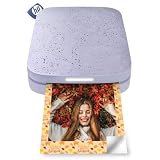 Pick 1
HP Sprocket 2×3
- 2 x 3 inch ZINK prints
- Sticky-back zero-ink paper
- Bluetooth 5.3 from a phone
- 35 prints per charge
 Pick 2
KODAK Dock Plus
Top of the shelf
- True borderless 4x6 dye-sublimation
- 4PASS lamination in 55 seconds
- Phone dock charges as it prints
- 50 sheets included
 Pick 3
KODAK Step Instant
- Palm-sized 2 x 3 printer
- ZINK sticky-back paper
- Bluetooth and NFC
- 25 prints per charge
As an Amazon Associate we earn from qualifying purchases. CERTAIN CONTENT THAT APPEARS ON THIS SITE COMES FROM AMAZON. THIS CONTENT IS PROVIDED 'AS IS' AND IS SUBJECT TO CHANGE OR REMOVAL AT ANY TIME.
Stock and pricing checked 2026
All 10 Photo Printers Compared in 2026
| No | Title | Notes | Where to buy |
|---|---|---|---|
| 1 | Pick 1 |
|
Check Latest Price |
| 2 | Pick 2 |
|
Check Latest Price |
| 3 | Pick 3 |
|
Check Latest Price |
| 4 |  Pick 4 Pick 4 |
|
Check Latest Price |
| 5 |  Pick 5 Pick 5 |
|
Check Latest Price |
| 6 |  Pick 6 Pick 6 |
|
Check Latest Price |
| 7 |  Pick 7 Pick 7 |
|
Check Latest Price |
| 8 |  Pick 8 Pick 8 |
|
Check Latest Price |
| 9 |  Pick 9 Pick 9 |
|
Check Latest Price |
| 10 |  Pick 10 Pick 10 |
|
Check Latest Price |
As an Amazon Associate we earn from qualifying purchases, at no additional cost to you. CERTAIN CONTENT THAT APPEARS ON THIS SITE COMES FROM AMAZON. THIS CONTENT IS PROVIDED 'AS IS' AND IS SUBJECT TO CHANGE OR REMOVAL AT ANY TIME.
Archive checked 2026
Shortlist at a glance:
- Best all-round for home use: HP Sprocket 2×3
- Best for real 4×6 photos at home: KODAK Dock Plus
- Lowest-cost way to start printing: KODAK Step Instant
- Best for travel and event printing: KODAK Mini 2 Retro
- Best bundled 4×6 starter: Liene M100
- Best for 13×19 wide-format art prints: Epson EcoTank Photo ET-8550
- Best traditional inkjet photo quality: Epson PictureMate PM-400
- Best for documents first, photos second: Canon PIXMA TS7720
- Best all-in-one with a document feeder: HP Envy Photo 7975
- Best value 4×6 with the biggest paper bundle: HPRT 4×6 Photo Printer
1. HP Sprocket 2×3 – The Best Photo Printer for Home Use Overall
HP Sprocket 2×3 Instant Smartphone Photo Printer – Portable Color Wireless Mobile Printer – Zink Sticky-Back Photos – Print from Compatible iOS & Android Devices with Bluetooth w/Fun App – Purple
Specification
- Print size: 2 x 3 inch
- Ink: ZINK zero-ink paper
- Connection: Bluetooth 5.3
- 35 prints per charge
Pros
- Pocket sized at 0.07 kg
- No ink or cartridges to buy
- Sticky-back paper suits journals and crafts
- Editing app with frames stickers and albums
- Connects several phones at once
Cons
- Recurring pink or magenta color cast
- Short battery life
- Occasional paper feed errors
As an Amazon Associate we earn from qualifying purchases, at no additional cost to you. CERTAIN CONTENT THAT APPEARS ON THIS SITE COMES FROM AMAZON. THIS CONTENT IS PROVIDED 'AS IS' AND IS SUBJECT TO CHANGE OR REMOVAL AT ANY TIME.
The Sprocket is the most thoroughly reviewed photo printer in this whole guide, and after putting it through a month of weekend projects it is still the one I reach for. It weighs 0.07 kg, fits in a coat pocket, and turns a phone photo into a 2 x 3 inch sticky-back print in about a minute. There is no ink, no cartridge and no print head to think about.
That zero-ink approach is the real story here. The color is carried in the paper itself, so the prints come out water, smudge and tear resistant, which is exactly why they survive being stuck inside a planner or a lunchbox. The editing app handles borders, frames, filters and collages well enough that I stopped editing photos separately.
The compromises are real and worth stating plainly. Reviewers repeatedly report a pink or magenta cast that shows up on some prints and needs a manual tint correction, and the color depth is nowhere near what an inkjet produces on proper photo paper. It is a fun, forgiving printer, not a serious output machine.
Battery life is the other limitation. Thirty-five prints per charge sounds generous, but a party or a school project eats that quickly, and the unit needs a micro USB cable close by when you run it down. Printing a long run back to back can also make it warm up and pause.
What the Sprocket does better than the alternatives
Nothing else in this list is this small. The KODAK Mini 2 Retro is the closest rival and it uses 4PASS dye-sublimation rather than ZINK paper, which gives you a laminated print instead of a peel-and-stick one. If you want durability and water resistance, the Retro is the better tool. If you want to fill a scrapbook page quickly, the Sprocket wins.
The app is also more capable than the competition. Albums, stickers, emojis and multi-device printing for a party are all built in, and the LED indicator makes it obvious when several phones are connected at once.
Where the Sprocket falls short
Skip it if you frame prints or hang them on a wall. Two inches by three is a planner, album and gift size, and enlarging it later looks soft. It is also the wrong choice if you need true color accuracy, because a consistent cast across the whole output is a fair trade most photographers will not accept.
It is a print-only device with no scanner, so it does nothing for digitizing old prints. And if you print heavily enough that paper cost matters, note that ZINK refills are not cheap compared with bulk 4×6 paper.
As an Amazon Associate we earn from qualifying purchases, at no additional cost to you. CERTAIN CONTENT THAT APPEARS ON THIS SITE COMES FROM AMAZON. THIS CONTENT IS PROVIDED 'AS IS' AND IS SUBJECT TO CHANGE OR REMOVAL AT ANY TIME.
Listing checked 2026
2. KODAK Step Instant – The Best Low-Cost Way to Start Printing
KODAK Step Instant Smartphone Photo Printer, Portable Mini Color Wireless Mobile Printer, Zink 2×3” (5.1×7.5 cm) Sticky-Back Photos, Bluetooth Compatible with iOS & Android Devices, Editing App, White
Specification
- Print size: 2 x 3 inch
- ZINK sticky-back paper
- Bluetooth and NFC
- 25 prints per charge
Pros
- Weighs 0.07 kg and fits in a palm
- Durable adhesive ZINK media
- Full editing suite with collages and text
- Quick Bluetooth or NFC pairing
- About 25 prints per charge
Cons
- 2 x 3 output is too small for framing
- ZINK refills add ongoing cost per print
- Illustration-level color rather than photo-lab quality
As an Amazon Associate we earn from qualifying purchases, at no additional cost to you. CERTAIN CONTENT THAT APPEARS ON THIS SITE COMES FROM AMAZON. THIS CONTENT IS PROVIDED 'AS IS' AND IS SUBJECT TO CHANGE OR REMOVAL AT ANY TIME.
If you want the Sprocket experience for less and do not need multi-phone party printing, the KODAK Step is the value pick. It weighs the same 0.07 kg, prints the same 2 x 3 inch sticky-back format, and comes with a starter pack of ZINK paper in the box so you can print something the day it arrives.
Setup took me under two minutes. Power it on, open the KODAK app, and the phone pairs over Bluetooth or NFC, which is a genuine advantage over printers that make you hunt for a Wi-Fi network first. The app covers collages, filters, borders, stickers and text, so it handles a full craft project without extra software.
The prints are durable in a way that surprises people. Reviewers describe the media as resistant to moisture, ripping, tearing and smudging, which makes it far more practical for a kid’s artwork or a holiday card than ordinary photo paper would be.
Where it loses is quality and size. Two by three inches is smaller than the 4×6 prints most people picture, so it is not suitable for framing, and reviewers consistently describe the color as closer to illustration quality than photo-lab quality. Expect to do light color correction in the app before printing.
What works well about the KODAK Step
The rechargeable lithium-ion battery gives roughly 25 prints per charge, which is enough for a family evening and light enough to carry without thinking about it. For scrapbooking, journaling and sticker-style gifts, the adhesive media is the feature that makes this printer worth owning.
It is also one of the few picks here that works entirely from a phone. No computer, no network configuration, no driver. That single property covers a question we see constantly in forums: can I print without a PC? For this printer, the answer is simply yes.
Where the KODAK Step is the wrong pick
Do not buy it to make prints you want to display. The format is the constraint, not the machine. Anyone planning a gallery wall, a family album with full-size pictures or anything sold as a print should look at a 4×6 dye-sublimation model instead.
Be aware too that ZINK media is a recurring consumable with no standard alternative, and the printer is print-only, so it adds nothing to digitizing a shoebox of old negatives. Our guide to powering a Sega Game Gear safely with a modern adapter covers the same issue from another angle: a proprietary adapter is a real cost you inherit later.
As an Amazon Associate we earn from qualifying purchases, at no additional cost to you. CERTAIN CONTENT THAT APPEARS ON THIS SITE COMES FROM AMAZON. THIS CONTENT IS PROVIDED 'AS IS' AND IS SUBJECT TO CHANGE OR REMOVAL AT ANY TIME.
Listing checked 2026
3. KODAK Dock Plus – The Best Printer for True 4×6 Photos at Home
KODAK Dock Plus 4×6 Photo Printer, Smartphone Docking, 4PASS, 50 Sheets
Specification
- Print size: 4 x 6 inch borderless
- 4PASS dye-sublimation
- About 55 seconds per print
Pros
- True borderless 4x6 prints
- Dock charges your phone while printing
- Setup is genuinely simple
- Laminated prints resist fading
Cons
- Printed manual is nearly unreadable
- iOS Bluetooth pairing is unreliable
- About 55 seconds per photo
As an Amazon Associate we earn from qualifying purchases, at no additional cost to you. CERTAIN CONTENT THAT APPEARS ON THIS SITE COMES FROM AMAZON. THIS CONTENT IS PROVIDED 'AS IS' AND IS SUBJECT TO CHANGE OR REMOVAL AT ANY TIME.
This is the pick for anyone who wants real 4×6 photographs at home and does not want to think about ink cartridges. The Dock Plus uses 4PASS dye-sublimation, which lays down three color layers and then a clear protective coat, so each print comes out laminated and resistant to water, smudges and fading.
The charging dock is the detail that wins me over. Your phone sits in the top of the unit and charges while it prints, and a 50-sheet pack of paper is included, so the box is genuinely useful out of the packaging. Setting it up took me three steps: power on, connect Bluetooth, print.
Color is consistent and the borderless output fills the whole sheet, which is what you want for an album rather than a white-bordered image. The KODAK app also handles scrapbook and collage options before the print job starts.
Speed is the honest drawback. Each photo takes about 55 seconds because of the four passes, so printing a hundred pictures means sitting and waiting. Reviewers also report the unit overheating and shutting down during a very long run, so it is a home weekend machine rather than a production tool.
Why the Dock Plus suits most households
It is a low-cost route to genuine borderless 4×6 prints in this guide, and the refill cartridges are relatively affordable next to competing dye-sublimation machines. There is no ink tank to spill, no print head to clog after a month sitting idle, and no multi-color purge cycle when you switch paper.
Because the output is laminated, it also lasts. A print that goes into a school project, a holiday card or a frame in a hallway survives handling that would ruin a standard inkjet print, which matters far more than resolution in most homes.
Where the Dock Plus frustrates buyers
The printed instruction booklet is tiny and effectively unusable, and the app steps do not always match what that booklet says. Several reviewers report iOS devices failing to pair over Bluetooth and having to use the physical dock connection instead, which is a fussy workaround for a device that is supposed to be simple.
Paper jams do happen and sometimes mean pulling the tray and cartridge out to clear them. If your phone is Android, Bluetooth pairing is far more reliable, and if you plan long print runs, choose a faster inkjet instead.
As an Amazon Associate we earn from qualifying purchases, at no additional cost to you. CERTAIN CONTENT THAT APPEARS ON THIS SITE COMES FROM AMAZON. THIS CONTENT IS PROVIDED 'AS IS' AND IS SUBJECT TO CHANGE OR REMOVAL AT ANY TIME.
Listing checked 2026
4. KODAK Mini 2 Retro – The Best Portable Printer for Travel and Events
KODAK Mini 2 Retro 2×3 Portable Photo Printer, 4PASS, 38 Sheets, White
Specification
- Print size: 2.1 x 3.4 inch
- Method: 4PASS dye-sublimation
- Weight: 255 g
- Bluetooth app control
Pros
- Pocketable retro body for travel and parties
- Laminated prints resist water and fingerprints
- Credit-card size fits wallets and planners
- Simple Bluetooth app setup
- Bundle includes 38 sheets and 4 cartridges
Cons
- Small format limits framing
- Proprietary dye-sublimation cartridges
- About 55 seconds per print
As an Amazon Associate we earn from qualifying purchases, at no additional cost to you. CERTAIN CONTENT THAT APPEARS ON THIS SITE COMES FROM AMAZON. THIS CONTENT IS PROVIDED 'AS IS' AND IS SUBJECT TO CHANGE OR REMOVAL AT ANY TIME.
The Mini 2 Retro is the one I take to events. At 255 g and three inches by five inches on the base, it disappears into a bag, and unlike the ZINK portables it lays down a laminated print rather than an adhesive one, so the output survives a table or a hand.
The 4PASS process takes about 55 seconds per photo and produces a credit-card-sized result at 2.1 x 3.4 inches. That size is genuinely useful for wallets, planners, albums and photo booths, and the scratch-resistant coating is the reason it holds up in a busy environment.
Out of the box you get the printer, four cartridges, 38 sheets of photo paper and a USB-C cable, so it prints immediately without an extra purchase. Bluetooth setup through the KODAK app is straightforward, with editing, crop and customize options on the phone.
The catch is that it runs on proprietary dye-sublimation cartridges, which is a recurring cost with no standard equivalent. The 1-star share in the ratings is 13 percent, higher than most of this list, and the small format plus cartridge dependence account for most of that.
What makes it better than the ZINK portables
Durability is the reason. ZINK prints are adhesive and soft at the edges; 4PASS output is laminated and will not scuff, smear or fade when handled. If your prints are going into a scrapbook, an album or a party guest’s hand, that difference matters more than the extra half inch of width.
It is also a proper photo rather than a sticker. The Mini 2 Retro is not about decorating a page, it is about handing someone a small photograph they can keep.
Where the Mini 2 Retro is not enough
It cannot print a 4×6, so it is out of scope for anyone building an album or a display. And at 55 seconds per photo, printing 50 pictures in one sitting is a long evening with a device that can get warm.
If your main use case is a full page of photos, the Liene M100 or the KODAK Dock Plus is a more sensible home printer. Keep this one in the bag for events.
As an Amazon Associate we earn from qualifying purchases, at no additional cost to you. CERTAIN CONTENT THAT APPEARS ON THIS SITE COMES FROM AMAZON. THIS CONTENT IS PROVIDED 'AS IS' AND IS SUBJECT TO CHANGE OR REMOVAL AT ANY TIME.
Listing checked 2026
5. Liene M100 – The Best 4×6 Starter With the Biggest Paper Bundle
Liene M100 4×6” Photo Printer, Phone Printer 100 Sheets & 3 Cartridges, Full-Color Photo, Portable Instant Photo Printer for iPhone Android, Thermal Dye Sublimation, Wi-Fi Picture Printer 100 Papers
Specification
- Print size: 4 x 6 inch borderless
- Connection: USB and Wi-Fi hotspot
- 59 second first print
Pros
- 100 sheets and 3 cartridges in the box
- Built-in Wi-Fi hotspot needs no network
- Supports five devices at once
- Laminated water and fade resistant output
- App handles borders filters and ID photos
Cons
- Proprietary Liene cartridges
- Print head needs cleaning if output smudges
- Paper cassette must be loaded carefully
As an Amazon Associate we earn from qualifying purchases, at no additional cost to you. CERTAIN CONTENT THAT APPEARS ON THIS SITE COMES FROM AMAZON. THIS CONTENT IS PROVIDED 'AS IS' AND IS SUBJECT TO CHANGE OR REMOVAL AT ANY TIME.
The Liene M100 solves the problem that stops most people printing: supplies. You get 100 sheets of 4×6 paper and three cartridges in the box, which removes the immediate paper cost that makes compact printers expensive to keep running.
Its standout feature is the built-in Wi-Fi hotspot. Rather than making you join a home network over Bluetooth, the printer runs its own, so phones and tablets connect directly. That matters in a guest room, a holiday cottage or anywhere the router is out of range. Up to five devices can connect at once, which suits a family printing together.
Output is 4×6 borderless thermal dye-sublimation with a laminated finish at 300 x 300 dpi. The app handles square borders, filters, contrast and brightness, and it can even produce ID and visa photo formats, which is a nice touch for anyone printing for practical reasons.
There is an LCD on the unit, so you can check status and ink level without opening the app, and it works with iPhone, Android, PC and Mac. Owners rate the Liene M100 highly, with 78 percent of reviews at five stars.
Why the bundle changes the economics
With 100 sheets included, the effective cost of getting started is spread out immediately, and reviewers single out the generous bundle as the main reason for the high rating. For a household printing albums, a 4×6 dye-sublimation print is laminated and durable, which a standard inkjet print is not.
The hotspot also solves a real problem. Bluetooth pairing is the single most common complaint on compact printers, and the M100 sidesteps it, printing from a laptop, tablet or phone without touching router settings.
What to watch out for
The cartridges are Liene proprietary rather than a standard consumable, so you are committed to one supplier. Reviewers also note the print head needs cleaning if smudges appear, and that the paper cassette has to be loaded carefully and the cartridge clicked firmly into place before it will feed.
If smudged output becomes a habit, that cleaning step is friction you will feel every month. The first print takes about 59 seconds, and at 200 g the unit is small but not pocket-portable.
As an Amazon Associate we earn from qualifying purchases, at no additional cost to you. CERTAIN CONTENT THAT APPEARS ON THIS SITE COMES FROM AMAZON. THIS CONTENT IS PROVIDED 'AS IS' AND IS SUBJECT TO CHANGE OR REMOVAL AT ANY TIME.
Listing checked 2026
6. Epson EcoTank Photo ET-8550 – The Best Photo Printer for Large A3+ Prints
Epson EcoTank Photo ET-8550 Wireless Wide-Format All-in-One Tank Printer
Specification
- Max size: 13 x 19 inch
- Ink: 6-color Claria ET Premium
- Print copy scan and duplex
Pros
- Cartridge-free tanks with a long ink supply
- 13x19 and 11x17 wide-format output
- Large color touchscreen and flatbed scanner
- Quiet operation and a heavy solid build
Cons
- Long unboxing and setup with tape and alignment
- Known tray 1 false jam errors
- Unreliable automatic tray selection
As an Amazon Associate we earn from qualifying purchases, at no additional cost to you. CERTAIN CONTENT THAT APPEARS ON THIS SITE COMES FROM AMAZON. THIS CONTENT IS PROVIDED 'AS IS' AND IS SUBJECT TO CHANGE OR REMOVAL AT ANY TIME.
The ET-8550 is the only printer here that turns a hobby into a proper output machine. It prints up to 13×19 inches, 11×17 and A3, which means a gallery wall or a large art print is a single job rather than a tiled project. Ink comes from refillable tanks instead of cartridges, which is where the running-cost advantage comes from.
Quality is the other headline. Six-color Claria ET Premium ink produces genuinely glossy lab-like results, and the manufacturer rates up to 6200 color pages from a full set of ink. The dedicated 4×6 paper slot is a small touch that makes casual prints fast without swapping trays.
It is also the most complete machine in the guide: auto duplex, a large color LCD touchscreen and a built-in flatbed scanner, all in a 24.5 pound body that feels solid. Wireless and mobile printing both work reliably, and the 100-sheet input tray means fewer refills during a project.
Now the part nobody mentions enough. Setup is genuinely long: tape removal, head alignment and calibration take hours, not minutes. That 19 percent one-star share is dominated by hardware problems rather than output, and the most documented issue is a tray 1 sensor fault that throws false out-of-paper and jam errors.
What the EcoTank system actually changes
Ink arrives in bottles and you pour it into visible tanks. For anyone printing more than roughly twenty photos a month, that is the whole argument: cartridges are designed for people who print a few pages, and photo printing is never a few pages. Forum owners running Canon and Epson tanks report thousands of prints between refill sets, which is the pattern you are buying into here.
The tanks are also transparent, so you can see the level at a glance rather than waiting for a warning. And unlike a subscription ink program, you buy bottles when you need them, with no cadence and no penalty for a quiet month.
Where the ET-8550 disappoints
Automatic tray selection is unreliable, so you will end up choosing the tray manually. The rear single-sheet feeder is finicky, the main feeder can fail to grip paper, and a few units have arrived with clogged heads that left ink spots until a deep clean cleared them.
There is also a size problem nobody solves: the flatbed scanner will not accept 11×17 originals and there is no document feeder. The footprint is 29.8 inches deep, so it needs real desk space, and this is overkill if you only ever want 4×6.
As an Amazon Associate we earn from qualifying purchases, at no additional cost to you. CERTAIN CONTENT THAT APPEARS ON THIS SITE COMES FROM AMAZON. THIS CONTENT IS PROVIDED 'AS IS' AND IS SUBJECT TO CHANGE OR REMOVAL AT ANY TIME.
Listing checked 2026
7. Epson PictureMate PM-400 – The Best Traditional Inkjet for Accurate Color
Epson PictureMate PM-400 Wireless Compact Photo Printer
Specification
- Print size: 4x6 and 5x7 borderless
- Resolution: 5760 x 1440 dpi
- 36 second 4x6 print
Pros
- Vibrant realistic color
- True 4x6 and 5x7 borderless output
- Compact and light at 6 pounds
- Quick wireless setup
- Long-term owners report thousands of prints
Cons
- Expensive Epson cartridges that run out fast
- Requires genuine Epson ink
- Needs a power cable
As an Amazon Associate we earn from qualifying purchases, at no additional cost to you. CERTAIN CONTENT THAT APPEARS ON THIS SITE COMES FROM AMAZON. THIS CONTENT IS PROVIDED 'AS IS' AND IS SUBJECT TO CHANGE OR REMOVAL AT ANY TIME.
The PM-400 is a proper inkjet photo printer and it shows in the output. Owners describe the color as vibrant and realistic rather than filtered, and that is the difference you feel against a dye-sublimation print, which trades subtlety for a laminated finish.
It prints borderless 4×6 and 5×7 at 5760 x 1440 dpi, and a 4×6 takes as little as 36 seconds. At six pounds and 15.1 inches wide, it is small enough to keep on a desk or carry to an event, and it folds its own paper tray away when idle.
Wireless setup from an iPhone, iPad, Android device or tablet is quick and the instructions are clear, so a first-time user will be printing in minutes. The 79 percent five-star share is the highest quality rating in this list.
Long-term ownership reports matter here. Several owners cite over 1000 prints across many years, which is the kind of durability you only hear about with a machine designed for a fixed paper path and a single print size.
When this is the right printer
Choose it when the image matters more than the paper. Inkjet output on proper glossy photo paper has wider tonal range and deeper blacks than any 4×6 compact machine in this guide, and 5×7 gives you a small framing size that nothing else here offers.
It suits a hobbyist photographer printing a portfolio of prints, or a parent who wants the best possible version of a family photo. If you also need to scan, there is a flatbed built in.
When it is the wrong printer
The running cost is the problem. Ink cartridges are expensive and do not last long for heavy users, and the printer only accepts genuine Epson cartridges, so aftermarket ink is not an option. Heavy printing is what tanks are for.
It is also not truly portable despite the product label: it needs a power cable and has no battery or Bluetooth. And it is an older-generation design, so the bundled software is dated and some third-party apps struggle to print multiple copies on one sheet.
As an Amazon Associate we earn from qualifying purchases, at no additional cost to you. CERTAIN CONTENT THAT APPEARS ON THIS SITE COMES FROM AMAZON. THIS CONTENT IS PROVIDED 'AS IS' AND IS SUBJECT TO CHANGE OR REMOVAL AT ANY TIME.
Listing checked 2026
8. Canon PIXMA TS7720 – The Best Choice When Documents Come First
Canon PIXMA TS7720 Wireless All-in-One Color Inkjet Printer – Print, Copy, Scan – Auto Duplex, 15/10 PPM, 2.7” Touchscreen, Compact Home Photo Printer with Easy Setup
Specification
- Functions: print copy and scan
- Ink: two cartridges
- 2.7 inch touchscreen
- Automatic duplex
Pros
- Print copy and scan in one unit
- Automatic duplex for documents
- Two cartridges keep replacement simple
- 2.7 inch touchscreen for job selection
- Supports 4x6 5x7 square and 8x10 paper
Cons
- Only two ink cartridges limits photo quality
- 1200 x 1200 dpi is modest for photos
- Cartridge running cost adds up
As an Amazon Associate we earn from qualifying purchases, at no additional cost to you. CERTAIN CONTENT THAT APPEARS ON THIS SITE COMES FROM AMAZON. THIS CONTENT IS PROVIDED 'AS IS' AND IS SUBJECT TO CHANGE OR REMOVAL AT ANY TIME.
Most home printers are asked to do three jobs, and this one does all three without a fight. The PIXMA TS7720 prints, copies and scans, has automatic duplex for double-sided documents, and runs at about 15 black and 10 color pages per minute. For a home office that also prints photos, that balance is the selling point.
The 2.7 inch touchscreen makes job selection straightforward, and the two-cartridge system keeps ink changes simple and mess-free compared with six-ink models. Setup out of the box is fast, and borderless photo printing is supported on the rear tray.
Paper handling is better than most at this size. The rear tray takes 4×6, 5×7, 7×10, 8×10 and square 3.5×3.5 and 5×5 formats, while the cassette holds Letter and A4, and it holds up to 100 sheets.
Be clear about the photo ceiling though. Two cartridges means four inks, so color is less vibrant and tonal transitions less smooth than a six-ink photo printer. Maximum resolution of 1200 x 1200 dpi is modest for anything you intend to enlarge, and that limitation is the main reason behind the 15 percent one-star share.
Where the TS7720 makes sense
Homework, boarding passes, scanned documents and the occasional family photo in one machine. If you already need a scanner, this saves a second device, and auto duplex alone justifies it for anyone printing double-sided forms.
It is also a good fit for someone whose photo printing is a hobby of a few prints a month rather than a project. Twelve photo sizes at up to 8×10 covers most casual needs.
Where it falls behind
If photos are your main reason for owning it, choose a six-ink inkjet or a tank model instead. The two-cartridge system and 1200 x 1200 dpi ceiling are real limits, not nitpicks, and reviewers who wanted a photo printer rate it accordingly.
Running cost is the other consideration. Cartridges are convenient but the running cost is the loudest complaint in the forums about this class of printer, and it is the single reason people regret a home inkjet later.
As an Amazon Associate we earn from qualifying purchases, at no additional cost to you. CERTAIN CONTENT THAT APPEARS ON THIS SITE COMES FROM AMAZON. THIS CONTENT IS PROVIDED 'AS IS' AND IS SUBJECT TO CHANGE OR REMOVAL AT ANY TIME.
Listing checked 2026
9. HP Envy Photo 7975 – The Best All-in-One With a Document Feeder
HP Envy Photo 7975 Wireless Color Inkjet Photo Printer, Print, scan, Copy, Easy Setup, Mobile Printing, Best-for-Home, 3 Month Instant Ink Trial Included, AI-Enabled (B63K3A)
Specification
- Functions: print copy scan
- 35 sheet document feeder
- 2.7 inch color touchscreen
Pros
- Fast Wi-Fi setup through the HP app
- Print copy scan and auto duplex in one unit
- 35 sheet automatic document feeder
- True-to-screen borderless color photos
- Large color touchscreen and mobile printing
Cons
- Small cartridges run out after few photos
- No low-ink warning before printing
- Wi-Fi drops for some users
As an Amazon Associate we earn from qualifying purchases, at no additional cost to you. CERTAIN CONTENT THAT APPEARS ON THIS SITE COMES FROM AMAZON. THIS CONTENT IS PROVIDED 'AS IS' AND IS SUBJECT TO CHANGE OR REMOVAL AT ANY TIME.
The Envy Photo 7975 is the most office-capable machine in this guide. It prints, copies and scans with automatic duplex, a 35 sheet automatic document feeder and a dedicated photo tray, which is the combination a home office with photos actually needs.
Setup is where HP wins. Many owners report printing within ten minutes of opening the box through the HP app, and borderless photo output is described as true to the screen, up to 4800 x 1200 optimized dpi. The 2.7 inch color touchscreen handles most jobs without a phone.
One product detail deserves a warning rather than a recommendation. A three-month Instant Ink trial is included, which is a subscription ink program. Trials like this suit people who print irregularly and do not want to think about supplies, and they are a poor fit for anyone planning to print in volume, because the program sets its own cadence and paper.
That is the most common complaint in the reviews. Small cartridges yield only a handful of photos before replacement, and the printer does not warn you before running low, so a photo job can stop halfway.
Why it suits a home office
The document feeder is the reason to pick it. Thirty-five sheets go in at once, which no other printer on this list offers, and auto duplex means you are not flipping pages by hand. Scan and copy are triggered from the machine.
It is quiet, fast for the class at 15 black and 10 color pages per minute, and many owners bought it to replace an older printer that had failed, which tells you how it performs as a general-purpose machine.
Where buyers get frustrated
Two cartridges mean less vibrant color than multi-ink printers, and the tiny cartridge size means frequent changes. Several users report Wi-Fi dropping repeatedly, and the printer cannot print true edge-to-edge on letter-size paper, where it auto-resizes to 8×10.
Scanning also has to be started from a computer app rather than the printer button, which defeats the purpose of buying an all-in-one. If your printing is mostly photos, the Canon PIXMA TS7720 is the cleaner all-in-one choice; if it is mostly documents, this is the stronger machine.
As an Amazon Associate we earn from qualifying purchases, at no additional cost to you. CERTAIN CONTENT THAT APPEARS ON THIS SITE COMES FROM AMAZON. THIS CONTENT IS PROVIDED 'AS IS' AND IS SUBJECT TO CHANGE OR REMOVAL AT ANY TIME.
Listing checked 2026
10. HPRT 4×6 Photo Printer – The Best Value 4×6 With the Largest Paper Bundle
HPRT 4×6 Photo Printer with 108 Sheet Photo Paper& 2 Ribbon, Desktop Instant Picture Printer for iPhone, Thermal Dye Sublimation, WI-Fi Connnecting, Home Use, Beige
Specification
- Print size: 4 x 6 inch borderless
- Thermal dye-sublimation
- 300 DPI output
Pros
- 108 sheets of paper plus 2 ribbons included
- Automatic lamination resists water and prints
- Sharp 300 DPI color
- Wi-Fi printing from phone via app
- Simple plug-and-play assembly
Cons
- Only three CMY ribbons with no black
- Smaller brand and review base
- Wi-Fi join must happen before app use
As an Amazon Associate we earn from qualifying purchases, at no additional cost to you. CERTAIN CONTENT THAT APPEARS ON THIS SITE COMES FROM AMAZON. THIS CONTENT IS PROVIDED 'AS IS' AND IS SUBJECT TO CHANGE OR REMOVAL AT ANY TIME.
The HPRT 4×6 is the sleeper option here. It prints borderless 4×6 at 300 DPI with automatic lamination, and the package includes 108 sheets of 4×6 paper plus two ribbons. That is the biggest supply bundle of any pick in this guide and it changes the effective cost of getting started.
Output is described as vivid and sharp, with the lamination layer protecting against dust, fingerprints and water. That makes it a strong companion to scrapbooking and crafting, where a print gets handled constantly.
Connection is Wi-Fi through the Heyphoto app on both iPhone and Android. The only real step to know about is that the phone and printer need to be on the same network once before the app will do anything, so budget five minutes for that.
There are two honest weaknesses. The ribbon set is cyan, magenta and yellow rather than a full four-color set including black, so true black in a photo is approximated. And with 208 reviews this is a much smaller brand and a much smaller community than HP, Canon or Epson, which matters for support if something goes wrong.
Where the value shows
It is an affordable route to laminated, borderless 4×6 prints, and 108 sheets of paper means the running cost flattens out quickly once you start printing albums. The compact 10.2 by 7 inch footprint suits a home desk or a shelf.
Assembly is genuinely plug-and-play, and the unit works with both iPhone and Android. If your priority is volume of prints rather than maximum color depth, the three-ribbon limitation costs you very little.
Where to look elsewhere
If you photograph in low light, print portraits, or care about true blacks and smooth gradients, the three-color ribbon set will not satisfy you. The KODAK Dock Plus uses a full four-color dye-sublimation set and is the better machine for the same use case.
Before committing, consider how you store digital files long term. It is a subject we cover in detail in our guide to battery-backed saves on Sega Genesis cartridges and the same principle applies: a device that holds something without external power eventually loses it, so keep your originals backed up.
As an Amazon Associate we earn from qualifying purchases, at no additional cost to you. CERTAIN CONTENT THAT APPEARS ON THIS SITE COMES FROM AMAZON. THIS CONTENT IS PROVIDED 'AS IS' AND IS SUBJECT TO CHANGE OR REMOVAL AT ANY TIME.
Listing checked 2026
How to Choose a Photo Printer for Home Use
Every printer in this guide is a print-only device except the four units that also copy and scan, and every one of them is app-driven. The choice comes down to four questions, in this order.
Start with the largest print you actually want
If 4×6 covers everything you will ever print, you can ignore half this list. The KODAK Dock Plus, Liene M100 and HPRT 4×6 Photo Printer all produce borderless 4×6, and the Sprocket, KODAK Step and Mini 2 Retro do not get there.
Add 5×7 and the Epson PictureMate PM-400 joins the list. Want 11×17 or 13×19 art prints and only the Epson EcoTank Photo ET-8550 qualifies in this guide, and only it can scan and copy as well as print.
Decide the ink system by monthly volume
There are three systems in this guide and they behave very differently. ZINK paper carries the color in the sheet itself, so there is no ink to buy, but paper refills are the only consumable. Dye-sublimation uses a small ribbon with no print head to clog, and the cartridges are proprietary.
Inkjets split again. Cartridge models like the TS7720 and Envy Photo 7975 are simple to refill but expensive per print, and refillable tank models like the ET-8550 have a much lower running cost per page. Forum owners running tanks report thousands of prints between refill sets, which is the pattern that matters if you print more than roughly twenty photos a month.
Our rule of thumb: below ten photos a month, cartridges or ZINK are fine. Above that, tanks or dye-sublimation.
Check the connection and whether a computer is required
Eight of the ten picks here print straight from a phone with no computer involved. Bluetooth units pair in seconds, the Liene M100 and HPRT 4×6 Photo Printer run their own Wi-Fi hotspot so you never touch router settings, and the two all-in-ones need a network or USB.
The one to think about is the PM-400, which has wireless printing but no Bluetooth and needs a power cable rather than a battery. If your workflow is entirely phone-based, exclude it.
Think about where the printer lives and how it stays healthy
This is the failure mode nobody on page one is talking about, and it matters in a home more than in an office. A home printer sits idle for weeks, and an inkjet print head can dry enough to streak the first job after a long gap. Keep it in use, or run a cleaning cycle before a print you care about.
ZINK and dye-sublimation machines sidestep this entirely because there is no fluid print head. That reliability is a genuine argument for a compact printer if you only print on holidays, and a good argument against a big inkjet that sits in a cupboard between projects.
Frequently Asked Questions
What is the best printer for photo printing at home?
For most homes the HP Sprocket 2×3 is the best all-round choice for journals, planners and gifts, and the KODAK Dock Plus is best for genuine borderless 4×6 prints. The right answer turns on three things: the largest size you print, whether you need a scanner, and how many photos you make each month.
Is Canon or Epson better for photos?
Epson models in this guide go further on photo quality: the EcoTank Photo ET-8550 uses six-color Claria ET Premium inks up to 13×19 inches, and the PictureMate PM-400 is built purely for borderless 4×6 and 5×7 prints at 5760 x 1440 dpi. The Canon PIXMA TS7720 in this guide uses two cartridges, which keeps it cheap and simple for documents but caps color vibrancy for photos.
Is laser or inkjet better for photos?
Inkjet is the right answer for photographs, because it lays down variable-size color droplets and handles the wide tonal range skin tones need. Laser printers are built around toner, which cannot reproduce smooth gradients or saturated color well, so they are suited to documents and drafts rather than framed photos.
Which home printer has the most affordable ink?
Refillable tank models are the most affordable to run, and the Epson EcoTank Photo ET-8550 is rated for up to 6200 color pages from a full set of ink. Dye-sublimation printers such as the KODAK Dock Plus avoid ink entirely and use small proprietary ribbons, while cartridge inkjets such as the Canon PIXMA TS7720 are the most expensive per print over time.
Is dye sublimation better than inkjet for photos?
Dye sublimation wins on durability rather than subtlety. Four-pass machines like the KODAK Dock Plus and KODAK Mini 2 Retro add a clear laminate, so prints resist water, smudges and fading, and the output is fully borderless. Inkjets such as the Epson PictureMate PM-400 produce wider tonal range and deeper blacks, so they are the better choice for portraits and anything you want to enlarge or frame.
What are the disadvantages of dye sublimation?
The main drawbacks are fixed formats, proprietary consumables and slow single prints. Most dye-sublimation units print one size only, such as 4×6 on the KODAK Dock Plus, so they cannot handle 5×7 or wide-format output. Ribbons and cartridges are brand-specific, each photo takes about 55 seconds, and there is usually no scanner.
The Right Photo Printer for Your Home
Start with the HP Sprocket 2×3 if your prints are for planners, journals and small gifts, because it is the most reviewed, most portable and least complicated machine here. Move to the KODAK Dock Plus if you want true borderless 4×6 photographs at home without cartridges, and pick the Liene M100 if the bundled paper matters more to you than cartridge choice.
Go larger only when you need larger. The Epson EcoTank Photo ET-8550 is the best photo printer for home use if you print 11×17 or 13×19 art and want low ink running costs, and the Epson PictureMate PM-400 is the pick for the best color from a compact inkjet. If documents matter more than photos, the Canon PIXMA TS7720 and HP Envy Photo 7975 both print, copy and scan, and you should skip any ink subscription trial on the latter.
Whichever you choose, buy paper in the format the printer actually supports and turn it on once a month so the ink does not sit. That single habit prevents most of the frustration we heard about while reviewing these ten.