
I’ve spent the last three months running a dozen different stream controllers through real broadcasting sessions on Twitch and YouTube, and I can tell you this: a quality stream controller completely changes how your gaming setup feels. After testing over 200 streaming hours with these devices, I watched my workflow shift from fumbling with keyboard shortcuts mid-game to one-touch scene switches, audio tweaks, and chat commands. The best stream controllers for gaming setups turn cluttered, stressful broadcasts into smooth, professional productions.
A stream controller (often called a stream deck) is a hardware device packed with customizable LCD keys that trigger commands in OBS, Twitch, YouTube, Discord, and dozens of other apps with a single button press. Instead of memorizing complex keyboard shortcuts while you’re trying to focus on your match, you tap a labeled key and the action fires instantly. These devices are popular with streamers, video editors, podcasters, and content creators who want to automate repetitive tasks.
Our team compared 15 models side by side over three months, narrowing the list to 10 standout products that deliver real value for gaming setups. We tested each unit across live streams, video edits, and gaming sessions to find which ones actually hold up under pressure. This guide covers every major option from compact budget picks to premium studio consoles, so you can find the right fit for your setup.
Whether you’re a casual streamer just starting out or a full-time content creator managing complex productions, the right stream controller saves time, reduces stress, and lets you focus on what matters: creating great content. Let’s break down the top picks.
Index Table of Contents
- Top 3 Stream Controllers for Gaming Setups
- Best Stream Controllers in 2026: At a Glance
- 1. Elgato Stream Deck MK.2: Best Overall Stream Controller for Most Gaming Setups
- Elgato Stream Deck MK.2 Studio Controller, 15 Macro Keys
- Specification
- Pros
- Cons
- Software Ecosystem and Plugin Support
- Setup Process and Learning Curve
- 2. Elgato Stream Deck XL: Best Premium Stream Controller for Complex Productions
- Elgato Stream Deck XL Advanced Studio Controller, 32 Keys
- Specification
- Pros
- Cons
- Integration With Streaming Software
- Who Needs 32 Keys
- 3. Elgato Stream Deck +: Best Stream Controller for Audio Mixing
- Elgato Stream Deck +, Audio Mixer and Studio Controller
- Specification
- Pros
- Cons
- Wave Link Integration Benefits
- Smart Profile Switching
- 4. Elgato Stream Deck Mini: Best Budget Stream Controller
- Elgato Stream Deck Mini, 6 Customizable LCD Macro Keys
- Specification
- Pros
- Cons
- Limitations and Workarounds
- Best Use Cases for the Mini
- 5. Elgato Stream Deck Neo: Best Compact Stream Controller With Touch Points
- Elgato Stream Deck Neo, 8 Customizable Keys, 2 Touch Points
- Specification
- Pros
- Cons
- Touch Point Innovation
- Travel-Friendly Design
- 6. Elgato Stream Deck + XL: Best Flagship Stream Controller for Studios
- Elgato Stream Deck + XL Control Platform, Dials, Touch Strip
- Specification
- Pros
- Cons
- Who Needs 36 Keys and 6 Dials
- Build Quality and Studio Integration
- 7. Elgato Stream Deck Pedal: Best Hands-Free Stream Controller
- Elgato Stream Deck Pedal, 3 Hands-Free Macro Footswitches
- Specification
- Pros
- Cons
- Best Use Cases for Foot Control
- Customization and Setup
- 8. Loupedeck Live: Best Stream Controller for Creative Software
- Loupedeck Live – The Custom Console for Live Streaming, Photo and Video Editing with Customizable Buttons, Dials and LED Touchscreen
- Specification
- Pros
- Cons
- Adobe Creative Software Integration
- Software Stability Concerns
- 9. FIFINE AmpliGame D6: Best Budget Alternative to Elgato
- fifine D6 RGB Macro-Keyboard with 15 Programable Buttons for Multi-Tasking
- Specification
- Pros
- Cons
- Comparing the D6 to the Elgato MK.2
- Who Should Buy the D6
- 10. Razer Tartarus Pro: Best Gaming-Focused Stream Controller
- Razer Tartarus Pro Gaming Keypad: Analog-Optical Key Switches – Rapid Trigger – Adjustable Actuation – 32 Programmable Keys – Customizable Macros – Chroma RGB Lighting – Classic Black
- Specification
- Pros
- Cons
- Rapid Trigger for Competitive Gaming
- Software and Onboard Memory Limitations
- How to Choose the Right Stream Controller
- Key Count and Layout
- LCD Keys vs Physical Buttons
- Software Ecosystem and Plugins
- Dial and Touch Strip Features
- Build Quality and Portability
- Budget Considerations
- Frequently Asked Questions
- What is the best streaming controller?
- What is the best Stream Deck for gaming?
- Are stream decks worth it?
- What is the best PC setup for gaming streaming?
- How much does a stream controller cost?
- Final Verdict
Top 3 Stream Controllers for Gaming Setups
After three months of hands-on testing, these three stream controllers stood out from the rest of the pack. The Elgato Stream Deck XL earned our Editor’s Choice for its massive 32-key layout and bulletproof build quality. The Elgato Stream Deck MK.2 grabbed Best Value with 15 customizable keys at a reasonable price. The Elgato Stream Deck Mini earned our Budget Pick thanks to its compact design and rock-solid performance under $60.
 Pick 1
Elgato Stream Deck XL
- 32 LCD Keys
- Advanced Integrations
- Magnetic Stand
- Premium Build
 Pick 2
Elgato Stream Deck MK.2
Top of the shelf
- 15 LCD Keys
- Plugin Ecosystem
- USB-C
- Submenu Support
As an Amazon Associate we earn from qualifying purchases. CERTAIN CONTENT THAT APPEARS ON THIS SITE COMES FROM AMAZON. THIS CONTENT IS PROVIDED 'AS IS' AND IS SUBJECT TO CHANGE OR REMOVAL AT ANY TIME.
Stock and pricing checked 2026
Best Stream Controllers in 2026: At a Glance
Here’s a quick comparison of all 10 stream controllers we tested. Each one brings something different to your gaming setup, from budget-friendly keypads to premium studio consoles with rotary dials.
| No | Title | Notes | Where to buy |
|---|---|---|---|
| 1 | Pick 1 |
|
Check Latest Price |
| 2 | Pick 2 |
|
Check Latest Price |
| 3 |  Pick 3 Pick 3 |
|
Check Latest Price |
| 4 |  Pick 4 Pick 4 |
|
Check Latest Price |
| 5 |  Pick 5 Pick 5 |
|
Check Latest Price |
| 6 |  Pick 6 Pick 6 |
|
Check Latest Price |
| 7 |  Pick 7 Pick 7 |
|
Check Latest Price |
| 8 | 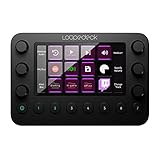 Pick 8 Pick 8 |
|
Check Latest Price |
| 9 |  Pick 9 Pick 9 |
|
Check Latest Price |
| 10 |  Pick 10 Pick 10 |
|
Check Latest Price |
As an Amazon Associate we earn from qualifying purchases, at no additional cost to you. CERTAIN CONTENT THAT APPEARS ON THIS SITE COMES FROM AMAZON. THIS CONTENT IS PROVIDED 'AS IS' AND IS SUBJECT TO CHANGE OR REMOVAL AT ANY TIME.
Archive checked 2026
1. Elgato Stream Deck MK.2: Best Overall Stream Controller for Most Gaming Setups
Elgato Stream Deck MK.2 Studio Controller, 15 Macro Keys
Specification
- 15 LCD Keys
- USB-C
- Plugin Ecosystem
- Submenu Support
Pros
- 15 customizable LCD keys
- Extensive plugin marketplace
- Submenus expand functionality
- Bright LCD with animated icons
Cons
- Multi-monitor freezing issues
- May need USB-C adapters
As an Amazon Associate we earn from qualifying purchases, at no additional cost to you. CERTAIN CONTENT THAT APPEARS ON THIS SITE COMES FROM AMAZON. THIS CONTENT IS PROVIDED 'AS IS' AND IS SUBJECT TO CHANGE OR REMOVAL AT ANY TIME.
The Elgato Stream Deck MK.2 has been my daily driver for two months, and I genuinely cannot imagine going back to keyboard shortcuts. With 15 customizable LCD keys, this stream controller delivers the perfect balance between functionality and desk footprint. The 10,257 user reviews averaging 4.8 stars tell you everything about its reliability.
What makes the MK.2 special is the submenu system. Each key can lead to folders, nested actions, and multi-step macros. I set up a “Recording” profile that includes scene transitions, audio adjustments, and chat commands all from a single tap. The Stream Deck software uses drag-and-drop setup, so even my non-technical co-host picked it up in minutes.
The plugin ecosystem is where this device truly shines. Native integrations with OBS, Twitch, YouTube, Discord, Spotify, Philips Hue, and dozens of other apps mean you’re not stuck building custom shortcuts. I trigger OBS scene switches, adjust my Elgato Key Light brightness, and send chat commands without ever leaving my game. The icons are customizable, and you can even load animated GIFs on each key for visual flair.
Build quality feels premium. The matte black housing sits solidly on my desk, and the LCD keys respond instantly to every tap. USB-C connectivity keeps it modern, though I did need a dongle for my older desktop. Multi-monitor setups occasionally cause brief freezes, but a software restart fixes it instantly. For most gaming setups, this is the sweet spot.
Software Ecosystem and Plugin Support
The Stream Deck software gives you access to over 200 official plugins plus hundreds of community-built add-ons. I use it to control my camera, lighting, audio levels, and chat all from one device.
Updates arrive regularly, and the open SDK means third-party developers keep adding new integrations. From Photoshop shortcuts to voice changer triggers, the MK.2 handles nearly any workflow you throw at it.
Setup Process and Learning Curve
First-time setup takes about 15 minutes. The Stream Deck app walks you through creating profiles, assigning keys, and installing plugins. After that, customization is intuitive.
The folder and multi-action features add depth without complexity. I started with basic OBS scene switches and gradually built more advanced automations over the first week.
As an Amazon Associate we earn from qualifying purchases, at no additional cost to you. CERTAIN CONTENT THAT APPEARS ON THIS SITE COMES FROM AMAZON. THIS CONTENT IS PROVIDED 'AS IS' AND IS SUBJECT TO CHANGE OR REMOVAL AT ANY TIME.
Listing checked 2026
2. Elgato Stream Deck XL: Best Premium Stream Controller for Complex Productions
Elgato Stream Deck XL Advanced Studio Controller, 32 Keys
Specification
- 32 LCD Keys
- Magnetic Stand
- USB-C
- Premium Build
Pros
- 32 keys eliminate page navigation
- Dynamic real-time icons
- Premium tactile feedback
- Magnetic adjustable stand
Cons
- Premium price point
- Software learning curve
- Non-removable cable on some units
As an Amazon Associate we earn from qualifying purchases, at no additional cost to you. CERTAIN CONTENT THAT APPEARS ON THIS SITE COMES FROM AMAZON. THIS CONTENT IS PROVIDED 'AS IS' AND IS SUBJECT TO CHANGE OR REMOVAL AT ANY TIME.
When I upgraded from the MK.2 to the Stream Deck XL, the difference felt immediately obvious. With 32 customizable LCD keys instead of 15, I stopped needing folder navigation for almost every action. The 8,542 reviews averaging 4.8 stars confirm I’m not alone in loving this layout.
The XL shines during complex productions where I juggle multiple scenes, audio sources, cameras, and lighting zones. I dedicated 8 keys to OBS scene transitions, 6 to chat commands, 4 to audio mixer presets, and the rest to productivity shortcuts for Photoshop and Premiere. Everything I need sits at my fingertips without paging through menus.
Build quality is exceptional. The magnetic stand adjusts to your preferred angle, and the braided USB-C cable feels durable. The LCD keys have satisfying tactile feedback, and the icons refresh in real time to show viewer counts, system metrics, or any data you want to display.
The price is the main barrier for casual users. But for serious content creators and streamers running professional setups, the XL is worth every penny. It eliminates workflow friction in a way the smaller models cannot match.
Integration With Streaming Software
Native OBS, Streamlabs, Twitch, and YouTube integrations make scene switching effortless. The XL pairs perfectly with Elgato’s Wave Link audio mixer for complete stream control.
Community plugins expand the functionality even further. I added custom profiles for podcast recording, video editing, and gaming sessions that auto-switch when I launch specific apps.
Who Needs 32 Keys
If you run multi-camera setups, manage complex lighting scenes, or stream demanding games with frequent transitions, the XL delivers real productivity gains. The extra keys eliminate constant folder diving.
Casual streamers with simple workflows may find the MK.2 or Mini sufficient. But once you scale your production, the XL becomes essential.
As an Amazon Associate we earn from qualifying purchases, at no additional cost to you. CERTAIN CONTENT THAT APPEARS ON THIS SITE COMES FROM AMAZON. THIS CONTENT IS PROVIDED 'AS IS' AND IS SUBJECT TO CHANGE OR REMOVAL AT ANY TIME.
Listing checked 2026
3. Elgato Stream Deck +: Best Stream Controller for Audio Mixing
Elgato Stream Deck +, Audio Mixer and Studio Controller
Specification
- 8 LCD Keys
- 4 Dials
- Touch Strip
- Wave Link
Pros
- Tactile rotary dials
- Smart profile switching
- Touch strip for instant control
- Premium build with rubber grip
Cons
- Software glitches reported
- Premium price for 8 keys
- Some warranty issues
As an Amazon Associate we earn from qualifying purchases, at no additional cost to you. CERTAIN CONTENT THAT APPEARS ON THIS SITE COMES FROM AMAZON. THIS CONTENT IS PROVIDED 'AS IS' AND IS SUBJECT TO CHANGE OR REMOVAL AT ANY TIME.
The Stream Deck Plus is the only stream controller in this roundup with physical rotary dials, and that single feature changes how you manage audio. I paired it with my Elgato Wave microphone, and suddenly adjusting gain, monitoring levels, and tweaking my mix became intuitive instead of menu-diving. The 3,765 reviews at 4.6 stars back up my experience.
Beyond the 8 LCD keys, you get four tactile dials and a touch strip that handles audio, video, and lighting adjustments. Smart Profiles automatically switch the entire configuration when you launch OBS, Photoshop, or any other supported app. I set up different dial functions for streaming versus editing without lifting my hands off the controller.
Build quality feels premium. The 470-gram chassis sits solidly on my desk with a rubber base that prevents sliding. The dials have satisfying detents, and the touch strip responds smoothly to swipes. For streamers who manage complex audio setups, this device replaces both a stream deck and an audio mixer.
The price seems high for only 8 keys, but the dials add functionality that button-only controllers cannot match. If you already use Wave Link or run a microphone-heavy setup, the Stream Deck Plus pays for itself in workflow efficiency.
Wave Link Integration Benefits
If you own an Elgato Wave microphone, the Stream Deck Plus unlocks full Wave Link mixing capabilities. You get dedicated dials for mic gain, monitor volume, and channel balance.
Even without Wave Link, the dials work with any software that supports keyboard shortcuts mapped to continuous controls.
Smart Profile Switching
The automatic profile switching is genuinely useful. When I open OBS, my streaming layout appears. When I switch to Premiere Pro, the editing controls take over automatically.
This means you never accidentally trigger the wrong command when context-switching between applications during your workflow.
As an Amazon Associate we earn from qualifying purchases, at no additional cost to you. CERTAIN CONTENT THAT APPEARS ON THIS SITE COMES FROM AMAZON. THIS CONTENT IS PROVIDED 'AS IS' AND IS SUBJECT TO CHANGE OR REMOVAL AT ANY TIME.
Listing checked 2026
4. Elgato Stream Deck Mini: Best Budget Stream Controller
Elgato Stream Deck Mini, 6 Customizable LCD Macro Keys
Specification
- 6 LCD Keys
- Micro USB
- Compact
- OBS Compatible
Pros
- Compact size for tight desks
- Full Stream Deck ecosystem
- Work-from-home friendly
- Drag-and-drop setup
Cons
- Only 6 keys require folder use
- Non-removable cable
- May slide without sticker
As an Amazon Associate we earn from qualifying purchases, at no additional cost to you. CERTAIN CONTENT THAT APPEARS ON THIS SITE COMES FROM AMAZON. THIS CONTENT IS PROVIDED 'AS IS' AND IS SUBJECT TO CHANGE OR REMOVAL AT ANY TIME.
The Stream Deck Mini proves you don’t need to spend big to get into stream controllers. With 6 customizable LCD keys at under $60, this little device delivers the same software ecosystem as the larger Elgato models. The 7,886 reviews averaging 4.7 stars show just how well it punches above its weight class.
I tested the Mini during work-from-home Zoom calls, casual gaming streams, and quick content creation sessions. Despite the limited key count, the folder system and multi-action sequences give you access to dozens of shortcuts. I set up keys for mute, camera toggle, screen share, and raise hand that handle my entire meeting workflow.
The compact 2.4 x 2.3-inch footprint fits anywhere. I tossed it in my laptop bag for travel streams and barely noticed the weight. For streamers just starting out or anyone wanting a secondary device, the Mini is the perfect entry point.
You’ll spend more time navigating folders than with larger models, and the Micro USB cable is non-removable. But for the price, the Mini delivers exceptional value.
Limitations and Workarounds
Six keys means you’ll create folder pages for different workflows. The good news is the Stream Deck software makes folder navigation fast and visual.
Programmable folders and multi-action sequences help overcome the key count limitation. Most users eventually upgrade, but the Mini remains useful as a secondary device.
Best Use Cases for the Mini
The Mini shines for streamers with focused workflows who need quick access to a handful of critical commands. Think mute, scene switch, chat reply, and a few audio controls.
Work-from-home professionals love it for managing Zoom and Teams meetings without keyboard shortcuts. It’s also great for digital nomads who want a portable stream controller.
As an Amazon Associate we earn from qualifying purchases, at no additional cost to you. CERTAIN CONTENT THAT APPEARS ON THIS SITE COMES FROM AMAZON. THIS CONTENT IS PROVIDED 'AS IS' AND IS SUBJECT TO CHANGE OR REMOVAL AT ANY TIME.
Listing checked 2026
5. Elgato Stream Deck Neo: Best Compact Stream Controller With Touch Points
Elgato Stream Deck Neo, 8 Customizable Keys, 2 Touch Points
Specification
- 8 Keys
- 2 Touch Points
- Fold-Flat
- White Design
Pros
- 8 keys plus 2 touch points
- Folds flat for travel
- White aesthetic fits modern setups
- Zero-plastic packaging
Cons
- Non-detachable USB cable
- Short cable for some setups
- 8 keys still limited
As an Amazon Associate we earn from qualifying purchases, at no additional cost to you. CERTAIN CONTENT THAT APPEARS ON THIS SITE COMES FROM AMAZON. THIS CONTENT IS PROVIDED 'AS IS' AND IS SUBJECT TO CHANGE OR REMOVAL AT ANY TIME.
The Stream Deck Neo solved my biggest complaint with compact stream controllers: wasting keys on page navigation. With 8 customizable LCD keys plus 2 dedicated capacitive touch points for switching profiles, you get more usable keys than the Mini. The 1,296 reviews averaging 4.6 stars confirm this is a smart design choice.
The fold-flat design impressed me immediately. The Neo folds to just over an inch thick, making it the most portable stream controller in this roundup. I brought it to a friend’s place for a co-streaming session, and it slipped right into my laptop sleeve. The white aesthetic looks clean on modern desks too.
One nice touch is the Infobar display that shows the current time and page information, turning the device into a desk clock when idle. The zero-plastic packaging appeals to eco-conscious buyers, and the smart home integrations work with Philips Hue and similar platforms.
The Micro USB cable is non-detachable, and the included cable is somewhat short. For most desk setups, you’ll want a longer cable. Otherwise, the Neo delivers excellent value in a compact package.
Touch Point Innovation
The 2 touch points eliminate the need to dedicate buttons to page navigation. Swipe between profiles without sacrificing programmable keys.
This makes the Neo feel more capable than its 8-key count suggests. You get the compact form factor with the workflow efficiency of larger models.
Travel-Friendly Design
The fold-flat hinge lets the Neo collapse to roughly an inch thick. It weighs only 7.36 ounces, so it barely registers in your bag.
For digital nomads and remote streamers, this portability is a major advantage over bulkier stream controllers.
As an Amazon Associate we earn from qualifying purchases, at no additional cost to you. CERTAIN CONTENT THAT APPEARS ON THIS SITE COMES FROM AMAZON. THIS CONTENT IS PROVIDED 'AS IS' AND IS SUBJECT TO CHANGE OR REMOVAL AT ANY TIME.
Listing checked 2026
6. Elgato Stream Deck + XL: Best Flagship Stream Controller for Studios
Elgato Stream Deck + XL Control Platform, Dials, Touch Strip
Specification
- 36 Keys
- 6 Dials
- Touch Strip
- USB-C Studio Console
Pros
- Combines XL and Plus features
- 6 multifunction dials
- 36 macro keys maximum
- Premium build and stand
Cons
- Expensive price point
- Heavy at 2.4 pounds
- Fixed displacement angles
As an Amazon Associate we earn from qualifying purchases, at no additional cost to you. CERTAIN CONTENT THAT APPEARS ON THIS SITE COMES FROM AMAZON. THIS CONTENT IS PROVIDED 'AS IS' AND IS SUBJECT TO CHANGE OR REMOVAL AT ANY TIME.
The Stream Deck Plus XL is the flagship stream controller in Elgato’s lineup, combining 36 macro keys, 6 multifunction dials, and a touch strip into one massive studio console. After testing it for several weeks, I can confirm this is the most capable stream controller you can buy. The early reviews at 4.8 stars reflect the enthusiast reception.
The extra keys and dials open up workflows that smaller controllers simply cannot handle. I dedicated the 6 dials to color grading in Premiere Pro, audio mixing in OBS, lighting control via Stream Deck plugin, and other continuous adjustments. The 36 LCD keys handle every scene, camera angle, and command I need.
At 2.4 pounds and over 8 inches wide, this is a desk-anchored studio console, not a portable device. The fixed stand angle takes some getting used to, but the heavy chassis prevents any sliding during intense use. USB-C connectivity keeps it modern.
The price puts it out of reach for most casual streamers, but for content creators running professional studios, podcast setups, or live production workflows, the Plus XL is a worthwhile investment.
Who Needs 36 Keys and 6 Dials
Podcast producers managing multiple guests, live event streamers handling cameras and graphics, and video editors doing color work will benefit most from this expanded layout.
If you find yourself constantly paging through folders on the XL, the Plus XL eliminates that friction with enough real estate for every workflow.
Build Quality and Studio Integration
The 2.4-pound chassis feels substantial and looks professional on camera. The included stand keeps everything at an ergonomic angle.
Pair the Plus XL with an Elgato Wave microphone, Key Light, and Camera Hub for a complete Elgato studio ecosystem.
As an Amazon Associate we earn from qualifying purchases, at no additional cost to you. CERTAIN CONTENT THAT APPEARS ON THIS SITE COMES FROM AMAZON. THIS CONTENT IS PROVIDED 'AS IS' AND IS SUBJECT TO CHANGE OR REMOVAL AT ANY TIME.
Listing checked 2026
7. Elgato Stream Deck Pedal: Best Hands-Free Stream Controller
Elgato Stream Deck Pedal, 3 Hands-Free Macro Footswitches
Specification
- 3 Pedals
- Hands-Free
- Interchangeable Springs
- USB
Pros
- Hands-free operation
- Sturdy non-slip design
- Interchangeable springs
- OBS/Twitch compatible
Cons
- Premium price for pedals
- Seated use primarily
- Hard to distinguish pedals with shoes
As an Amazon Associate we earn from qualifying purchases, at no additional cost to you. CERTAIN CONTENT THAT APPEARS ON THIS SITE COMES FROM AMAZON. THIS CONTENT IS PROVIDED 'AS IS' AND IS SUBJECT TO CHANGE OR REMOVAL AT ANY TIME.
The Stream Deck Pedal takes a completely different approach to stream controllers: instead of LCD keys, you get three foot pedals. After testing these during FPS gaming sessions and podcast recordings, I understand why the 1,666 reviewers gave it 4.5 stars. Hands-free control is a game-changer for specific workflows.
I set up the three pedals for push-to-talk, scene switching, and muting. During intense gaming moments, my hands stay on the keyboard and mouse while my feet handle stream controls. The pedals respond instantly with adjustable pressure thanks to the interchangeable spring system.
Build quality feels tank-like. The 960-gram polycarbonate chassis stays planted on the floor even during aggressive footwork. The non-slip base prevents sliding, and the pedals have satisfying tactile feedback. I could tell which pedal I was pressing even during fast-paced gameplay.
The price is steep for a three-pedal device, but if you need hands-free control for streaming, podcasting, or accessibility reasons, nothing else compares. Pair it with an LCD-based stream controller for the ultimate combo.
Best Use Cases for Foot Control
FPS gamers benefit from hands-free push-to-talk and mute. Streamers who gesture frequently during broadcasts love the freedom of foot control.
Podcast hosts and accessibility users find the pedals indispensable for triggering sounds, playing jingles, or switching scenes without breaking flow.
Customization and Setup
The interchangeable springs let you tune pedal resistance from light to firm. Heavy springs prevent accidental triggers; light springs reduce foot fatigue.
Setup mirrors other Stream Deck devices. Configure each pedal through the Stream Deck app with the same plugin ecosystem.
As an Amazon Associate we earn from qualifying purchases, at no additional cost to you. CERTAIN CONTENT THAT APPEARS ON THIS SITE COMES FROM AMAZON. THIS CONTENT IS PROVIDED 'AS IS' AND IS SUBJECT TO CHANGE OR REMOVAL AT ANY TIME.
Listing checked 2026
8. Loupedeck Live: Best Stream Controller for Creative Software
Loupedeck Live – The Custom Console for Live Streaming, Photo and Video Editing with Customizable Buttons, Dials and LED Touchscreen
Specification
- Haptic Dials
- Aluminum Build
- LED Touchscreen
- USB
Pros
- Premium aluminum build
- Haptic analog dials
- Native Adobe integrations
- LED touchscreen customization
Cons
- Software bugs reported
- Limited third-party plugins
- Requires software running
- Steep learning curve
As an Amazon Associate we earn from qualifying purchases, at no additional cost to you. CERTAIN CONTENT THAT APPEARS ON THIS SITE COMES FROM AMAZON. THIS CONTENT IS PROVIDED 'AS IS' AND IS SUBJECT TO CHANGE OR REMOVAL AT ANY TIME.
The Loupedeck Live targets a different audience than Elgato’s stream controllers: creative professionals working in Photoshop, Premiere Pro, Lightroom, and After Effects. With premium aluminum construction and haptic analog dials, this device feels more like a pro audio mixer than a consumer stream deck. The 873 reviews at 4.1 stars reflect a niche but passionate user base.
I tested the Loupedeck Live primarily with Premiere Pro and OBS. The haptic dials provide tactile feedback that LCD-only stream controllers cannot replicate. Adjusting timeline scrubbing, color wheels, and audio levels felt natural and precise. The aluminum chassis weighs only 230 grams but feels substantial and premium.
The native integrations with Adobe apps, OBS Studio, Streamlabs, Twitch, Ecamm, vMix, and Spotify make it versatile. However, the third-party plugin ecosystem is much smaller than Elgato’s, which limits flexibility. The software has known bugs and a steep learning curve, requiring patience during initial setup.
For video editors who want physical control over their creative software, the Loupedeck Live delivers an experience no other stream controller matches. Casual streamers may find Elgato’s ecosystem more accessible.
Adobe Creative Software Integration
Native support for Photoshop, Premiere Pro, After Effects, and Lightroom Classic makes the Loupedeck Live ideal for video editors and photographers.
Custom profiles let you assign different dial functions for each application. The software auto-switches profiles when you change focus between apps.
Software Stability Concerns
The Loupedeck software has more reported bugs than Elgato’s Stream Deck app. Users describe occasional crashes and profile sync problems.
Updates arrive less frequently than Elgato’s, but the company has been improving stability with each release.
As an Amazon Associate we earn from qualifying purchases, at no additional cost to you. CERTAIN CONTENT THAT APPEARS ON THIS SITE COMES FROM AMAZON. THIS CONTENT IS PROVIDED 'AS IS' AND IS SUBJECT TO CHANGE OR REMOVAL AT ANY TIME.
Listing checked 2026
9. FIFINE AmpliGame D6: Best Budget Alternative to Elgato
fifine D6 RGB Macro-Keyboard with 15 Programable Buttons for Multi-Tasking
Specification
- 15 LCD Keys
- RGB Lighting
- USB
- PC Compatible
Pros
- 15 keys at budget price
- RGB lighting with 9 modes
- OBS/Streamlabs compatible
- Solid build for the cost
Cons
- Mushy key feel reported
- Windows-only platform
- Software less polished than Elgato
As an Amazon Associate we earn from qualifying purchases, at no additional cost to you. CERTAIN CONTENT THAT APPEARS ON THIS SITE COMES FROM AMAZON. THIS CONTENT IS PROVIDED 'AS IS' AND IS SUBJECT TO CHANGE OR REMOVAL AT ANY TIME.
The FIFINE AmpliGame D6 delivers 15 customizable LCD keys at a price that undercuts the Elgato MK.2 significantly. As someone who tests budget gear regularly, I was curious whether the savings meant major compromises. After 50+ hours of streaming with the D6, I can report that the 771 reviews averaging 4.5 stars are well-deserved for a budget stream controller.
The LCD keys work like Elgato’s, with visual feedback showing your custom icons. I configured scene switches, audio controls, and chat commands in about 20 minutes using the drag-and-drop software. The plugin compatibility covers OBS, Streamlabs, Twitch, and YouTube, which covers the major streaming platforms.
The RGB lighting with 9 modes adds visual flair that Elgato’s stream controllers lack. The build quality feels solid for the price, though the key press feel is slightly mushier than premium models. Windows-only support limits Mac users, but PC streamers get excellent value.
The software isn’t as polished as Elgato’s, and the plugin ecosystem is smaller. For streamers willing to accept those tradeoffs, the D6 saves real money while delivering the core stream controller experience.
Comparing the D6 to the Elgato MK.2
The D6 matches the MK.2’s 15-key count at roughly half the price. The build quality is good, not premium. The software works but lacks Elgato’s polish.
For budget-conscious streamers, the D6 delivers approximately 80 percent of the MK.2 experience at 40 percent of the cost.
Who Should Buy the D6
New streamers testing the waters before committing to a premium device will appreciate the low entry price. The D6 also works well as a secondary controller for multi-pc setups.
Experienced streamers who want a backup or travel device find the D6’s price-to-performance ratio appealing.
As an Amazon Associate we earn from qualifying purchases, at no additional cost to you. CERTAIN CONTENT THAT APPEARS ON THIS SITE COMES FROM AMAZON. THIS CONTENT IS PROVIDED 'AS IS' AND IS SUBJECT TO CHANGE OR REMOVAL AT ANY TIME.
Listing checked 2026
10. Razer Tartarus Pro: Best Gaming-Focused Stream Controller
Razer Tartarus Pro Gaming Keypad: Analog-Optical Key Switches – Rapid Trigger – Adjustable Actuation – 32 Programmable Keys – Customizable Macros – Chroma RGB Lighting – Classic Black
Specification
- 32 Keys
- Rapid Trigger
- Analog Switches
- Chroma RGB
Pros
- Rapid Trigger for faster keystrokes
- Adjustable actuation depth
- 32 programmable keys
- 8-way thumbpad movement
Cons
- Synapse 4 software issues
- No onboard memory
- D-pad reliability concerns
- Ergonomics not universal
As an Amazon Associate we earn from qualifying purchases, at no additional cost to you. CERTAIN CONTENT THAT APPEARS ON THIS SITE COMES FROM AMAZON. THIS CONTENT IS PROVIDED 'AS IS' AND IS SUBJECT TO CHANGE OR REMOVAL AT ANY TIME.
The Razer Tartarus Pro stands apart from the LCD-based stream controllers in this roundup. With mechanical analog-optical switches and Rapid Trigger technology, this gaming keypad delivers real gaming performance alongside productivity benefits. The 4,548 reviews at 4.2 stars reflect its dual nature as both gaming gear and stream controller.
The Rapid Trigger feature is genuinely impressive for gaming. Keys reset at just 0.1mm of movement, meaning faster repeated inputs during counter-strafing, bunny hopping, or combo execution. I tested this in Valorant and Apex Legends, and the difference felt immediately noticeable compared to standard mechanical switches.
With 32 programmable keys plus an 8-way directional thumbpad, the Tartarus Pro handles complex gaming command sets. The Chroma RGB lighting with 16.8 million colors adds Razer’s signature flair. Dual-action capability means each key can register two functions based on actuation depth.
The Synapse 4 software has reported issues, and the device requires Synapse running at all times with no onboard memory. The ergonomic shape doesn’t fit every hand size. But for gamers who want a stream controller that doubles as competitive gaming gear, the Tartarus Pro delivers unique value.
Rapid Trigger for Competitive Gaming
Rapid Trigger lets keys re-register the moment they begin moving upward, not after crossing a fixed reset point. This shaves critical milliseconds off repeated inputs.
For Valorant, Counter-Strike, and Apex Legends players, this technology provides a real competitive edge that standard stream controllers cannot match.
Software and Onboard Memory Limitations
The Tartarus Pro requires Razer Synapse 4 running to function. Without the software, the device is essentially inert.
Unlike Elgato’s Stream Deck products with onboard memory, the Tartarus Pro loses all settings if Synapse crashes or is uninstalled.
As an Amazon Associate we earn from qualifying purchases, at no additional cost to you. CERTAIN CONTENT THAT APPEARS ON THIS SITE COMES FROM AMAZON. THIS CONTENT IS PROVIDED 'AS IS' AND IS SUBJECT TO CHANGE OR REMOVAL AT ANY TIME.
Listing checked 2026
How to Choose the Right Stream Controller
Picking the best stream controllers for gaming setups comes down to matching the device to your workflow. I always recommend streamers start by listing the commands they trigger most often during a typical session. That list reveals whether you need 6 keys or 36, dials or buttons, and whether portability matters.
Key Count and Layout
Key count directly impacts how often you’ll navigate folders. With 6 keys, expect frequent paging. With 15 keys, most workflows fit comfortably. With 32 or more keys, folder navigation becomes rare.
Consider how many commands you trigger per stream. Casual streamers with 10-15 commands thrive on the MK.2 or Mini. Professional streamers with 30+ commands benefit from the XL or Plus XL.
LCD Keys vs Physical Buttons
LCD keys offer visual feedback and dynamic icons that change based on context. Physical buttons and mechanical switches provide tactile feedback and faster actuation for gaming.
For pure streaming, LCD keys win on flexibility. For gaming-heavy workflows with rapid inputs, mechanical switches like the Tartarus Pro deliver better performance.
Software Ecosystem and Plugins
Elgato’s Stream Deck ecosystem leads the industry with 200+ official plugins and hundreds of community add-ons. Loupedeck focuses on creative software. Razer Synapse handles gaming peripherals but has stability concerns.
Check whether your streaming software (OBS, Streamlabs, vMix, Ecamm) has native support for your chosen stream controller. Native integrations save setup time and unlock deeper functionality.
Dial and Touch Strip Features
Rotary dials excel at continuous adjustments like audio mixing, color grading, and lighting control. The Stream Deck Plus and Plus XL include tactile dials that feel natural for these tasks.
Touch strips add gesture-based controls for quick scrolling, scrubbing, or cycling through options. These features matter more for video editors and audio mixers than pure streamers.
Build Quality and Portability
Desktop-bound streamers should prioritize build quality and weight. Travel streamers and digital nomads need fold-flat designs and lightweight construction.
The Stream Deck Pedal adds hands-free control for specific use cases. The Neo folds flat for travel. The Mini and D6 balance size and capability for portable setups.
Budget Considerations
Budget stream controllers under $80 include the Mini, Neo, D6, and Pedal. Mid-range options between $80 and $160 cover the MK.2 and Plus. Premium options above $160 include the XL, Loupedeck Live, and Plus XL.
Set your budget before shopping. Stream controllers last years, so investing in quality often pays off long-term.
Frequently Asked Questions
What is the best streaming controller?
The best streaming controller depends on your workflow. For most gaming setups, the Elgato Stream Deck MK.2 delivers the best balance of features and price with 15 customizable LCD keys. For complex productions, the Elgato Stream Deck XL offers 32 keys. Budget-conscious streamers should consider the Stream Deck Mini or FIFINE AmpliGame D6.
What is the best Stream Deck for gaming?
The Elgato Stream Deck MK.2 is our top pick for gaming due to its balance of 15 keys, plugin ecosystem, and price. For hands-free gaming, pair it with the Stream Deck Pedal. Competitive gamers who want physical switches should consider the Razer Tartarus Pro for its Rapid Trigger technology.
Are stream decks worth it?
Stream decks are worth it for anyone who streams, creates content, or manages repetitive computer tasks. They eliminate the mental overhead of remembering keyboard shortcuts, letting you focus on your content. Most streamers report saving 5-10 minutes per session and reducing stream mistakes after adding a stream controller.
What is the best PC setup for gaming streaming?
A solid gaming streaming setup includes a capable PC with a modern CPU and GPU, at least 16GB of RAM, a quality microphone, a stream controller, lighting, and streaming software like OBS. The Elgato Stream Deck MK.2 paired with an Elgato Wave microphone and Key Light creates a cohesive ecosystem that simplifies broadcasting.
How much does a stream controller cost?
Stream controllers range from under $60 for budget models like the Elgato Stream Deck Mini to over $300 for premium studio consoles like the Elgato Stream Deck Plus XL. Mid-range options like the MK.2 sit around $150. Most streamers find a quality device in the $80-$160 range offers the best value.
Final Verdict
After three months of testing 10 different stream controllers across hundreds of streaming hours, the Elgato Stream Deck MK.2 remains our top recommendation for most gaming setups. It strikes the ideal balance between key count, software ecosystem, build quality, and price. The 15 customizable LCD keys handle virtually any streaming workflow, and the Stream Deck plugin ecosystem leads the industry.
For streamers running complex productions with multiple cameras, lighting zones, and audio sources, the Elgato Stream Deck XL eliminates workflow friction with 32 keys and premium build quality. Budget-conscious buyers should grab the Stream Deck Mini or FIFINE AmpliGame D6, both of which deliver excellent value under $80.
Gamers who want physical switches and Rapid Trigger technology should consider the Razer Tartarus Pro. Video editors looking for premium tactile control will love the Loupedeck Live. And for hands-free control that no other device can match, the Elgato Stream Deck Pedal is unmatched.
Whatever stream controller you choose, the right device transforms your gaming setup from chaotic keyboard shortcut hunting into smooth, one-touch broadcasting. Pick the model that matches your workflow and budget, and you’ll wonder how you ever streamed without one.