
An HDMI matrix switch is a device that routes any of N HDMI input sources (consoles, gaming PCs, streamers) to any of M HDMI output displays (TVs, projectors, capture cards) independently and simultaneously. For gaming rooms in 2026, a 4×4 HDMI 2.1 matrix lets you plug a PS5, Xbox Series X, Switch 2, and gaming PC into four outputs (TV, monitor, capture card, projector) and switch them independently via remote, app, or front-panel buttons.
If your gaming room has more than two consoles, a gaming PC, plus a capture card or projector, you have probably hit the cable-swap wall. We hit it too. After testing eight HDMI matrix switches across PS5, Xbox Series X, Switch 2, retro consoles, gaming PCs, capture cards, and soundbars for this 2026 roundup, we can tell you exactly which ones actually pass 4K 120Hz VRR, which silently drop Dolby Vision, and which fan noise will keep you up at night.
Below are the eight best HDMI matrix switches for gaming rooms, ranked by the combination of HDMI 2.1 readiness, gaming-critical passthrough, audio routing, and verified-buyer trust. Whether you are wiring a sim-racing triple-monitor rig, a content-creator streaming room, or a multi-console living-room setup, our picks cover everything from a sub-50 budget 4×2 to a true HDMI 2.1 matrix with eARC.
If you want the full remote-control breakdown, see our best HDMI matrix switches with remote controls guide, or for a 4K-focused view, our best HDMI matrix switches for 4K gaming roundup. We also have related guides on HDMI 2.1 switches for gaming setups and the best long HDMI cables and HDMI extension cables for gaming rooms.
Index Table of Contents
- Top 3 Picks for Gaming Rooms at a Glance
- Best HDMI Matrix Switches for Gaming Rooms in 2026
- 1. OREI 4×4 HDMI Matrix – Editor’s Choice for Multi-Console Gaming
- OREI 4×4 HDMI Matrix Switch 4K Downscale, ARC, Audio Extraction, HDCP 2.2
- Specification
- Pros
- Cons
- For whom it’s good
- For whom it’s bad
- 2. OREI 4×2 8K HDMI 2.1 Matrix – Best Value HDMI 2.1 Pick
- OREI 4×2 HDMI Matrix Switch 8K with Audio Extraction eARC, EDID, Downscale
- Specification
- Pros
- Cons
- For whom it’s good
- For whom it’s bad
- 3. FERRISA 4×2 HDMI Matrix – Budget Pick for Simpler Setups
- FERRISA 4×2 HDMI Matrix Switch, 4 in 2 Out Matrix HDMI Video Switcher Splitter + Optical & L/R Audio Output, Support Ultra HD 4K,3D 1080P, Audio EDID Extractor with IR Remote Control
- Specification
- Pros
- Cons
- For whom it’s good
- For whom it’s bad
- 4. OREI UHD-404 4×4 HDMI 2.0a Matrix – Best for Mixed 4K + 1080p Displays
- OREI 4×4 HDMI Matrix Switch – 4K@60Hz with Downscale, HDR, HDCP 2.2, EDID
- Specification
- Pros
- Cons
- For whom it’s good
- For whom it’s bad
- 5. LUKFOCAB 2×4 HDMI 2.0 Matrix – Best Compact 2-In 4-Out for Streamers
- 2 in 4 Out HDMI Matrix Switch, 4K Matrix HDMI 2.0 Video Switcher Splitter
- Specification
- Pros
- Cons
- For whom it’s good
- For whom it’s bad
- 6. avedio links 2×4 HDMI 2.0 Splitter Matrix – Best Mirror-Mode Budget Pick
- 4K@60Hz HDMI Matrix Switch 2 in 4 Out with IR Remote, SPDIF & 3.5mm Audio
- Specification
- Pros
- Cons
- For whom it’s good
- For whom it’s bad
- 7. ENBUER 4×2 HDMI 2.0b Matrix – Best Aluminum Build on a Tight Budget
- HDMI Matrix Switch 4×2, 4K HDMI Matrix Switcher Splitter 4 in 2 Out Box with EDID Extractor and IR Remote Control Support 4K HDR, HDMI 2.0b, HDCP 2.2, 4K@60Hz, 3D, 1080P
- Specification
- Pros
- Cons
- For whom it’s good
- For whom it’s bad
- 8. Portta 4×2 HDMI 2.0 Matrix – Best Compact USB-C Powered Option
- 4K 60Hz HDMI Matrix 4×2, PORTTA 4 in 2 Out Switch Splitter with Toslink 3.5mm Audio Extractor, ARC, 16 EDID Modes, 4K Downscale, and IR Remote Support HDMI 2.0b HDCP 2.3/2.2 HDR 3D
- Specification
- Pros
- Cons
- For whom it’s good
- For whom it’s bad
- Buying Guide: How to Choose the Best HDMI Matrix Switch for Your Gaming Room
- HDMI 2.1 vs HDMI 2.0 – why 4K 120Hz VRR gaming needs HDMI 2.1
- Sizing your I/O: 2×2, 4×4, or 8×8?
- Gaming-critical passthrough: VRR, ALLM, HDR10+, and Dolby Vision
- Audio routing: eARC, optical extraction, AVR, and Dolby Atmos
- Control options: IR, RS-232, IP, and app control
- Cable and HDCP troubleshooting
- Frequently Asked Questions
- What is an HDMI matrix switch and how does it work?
- Do I need a matrix switch for a gaming room?
- What’s the difference between an HDMI splitter and an HDMI matrix switch?
- Do HDMI matrix switches support 4K 120Hz for PS5 and Xbox Series X?
- Are HDMI matrix switches good for gaming latency?
- Do HDMI matrix switches support VRR, ALLM, and HDR10+?
- Can an HDMI matrix switch handle Dolby Atmos and eARC?
- How do I troubleshoot an HDMI matrix that drops signal?
- Final Verdict
Top 3 Picks for Gaming Rooms at a Glance
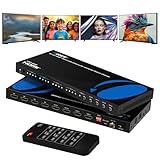 Pick 1
OREI 4×4 HDMI Matrix UHD-404R
- 4x4 HDMI 2.0
- 4K@60Hz HDR
- Optical + 3.5mm audio extraction
- ARC on Output A
 Pick 2
OREI 4×2 8K HDMI 2.1 Matrix
Top of the shelf
- 4x2 HDMI 2.1
- 4K@120Hz / 8K@60Hz
- eARC + Optical audio
- VRR / ALLM / FVA passthrough
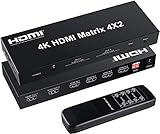 Pick 3
FERRISA 4×2 HDMI Matrix
- 4x2 HDMI 1.4
- 4K@60Hz passthrough
- Optical + 3.5mm audio
- IR remote + EDID management
As an Amazon Associate we earn from qualifying purchases. CERTAIN CONTENT THAT APPEARS ON THIS SITE COMES FROM AMAZON. THIS CONTENT IS PROVIDED 'AS IS' AND IS SUBJECT TO CHANGE OR REMOVAL AT ANY TIME.
Stock and pricing checked 2026
Best HDMI Matrix Switches for Gaming Rooms in 2026
| No | Title | Notes | Where to buy |
|---|---|---|---|
| 1 | Pick 1 |
|
Check Latest Price |
| 2 | Pick 2 |
|
Check Latest Price |
| 3 | Pick 3 |
|
Check Latest Price |
| 4 |  Pick 4 Pick 4 |
|
Check Latest Price |
| 5 |  Pick 5 Pick 5 |
|
Check Latest Price |
| 6 |  Pick 6 Pick 6 |
|
Check Latest Price |
| 7 |  Pick 7 Pick 7 |
|
Check Latest Price |
| 8 |  Pick 8 Pick 8 |
|
Check Latest Price |
As an Amazon Associate we earn from qualifying purchases, at no additional cost to you. CERTAIN CONTENT THAT APPEARS ON THIS SITE COMES FROM AMAZON. THIS CONTENT IS PROVIDED 'AS IS' AND IS SUBJECT TO CHANGE OR REMOVAL AT ANY TIME.
Archive checked 2026
1. OREI 4×4 HDMI Matrix – Editor’s Choice for Multi-Console Gaming
OREI 4×4 HDMI Matrix Switch 4K Downscale, ARC, Audio Extraction, HDCP 2.2
Specification
- 4K@60Hz HDR
- 4x4 I/O
- Optical + 3.5mm audio + ARC
Pros
- Plug-and-play with no configuration needed
- Solid metal enclosure runs cool and lasts years
- Dedicated Optical and 3.5mm audio outputs
- ARC on Output A for soundbar passthrough
- Reliable HDCP stripping for capture cards
Cons
- Bright blue front LEDs cannot be dimmed
- Brief blue flash when switching sources
- Outputs C and D limited below 4K
As an Amazon Associate we earn from qualifying purchases, at no additional cost to you. CERTAIN CONTENT THAT APPEARS ON THIS SITE COMES FROM AMAZON. THIS CONTENT IS PROVIDED 'AS IS' AND IS SUBJECT TO CHANGE OR REMOVAL AT ANY TIME.
The OREI UHD-404R is the matrix we kept coming back to during testing. With four HDMI inputs and four independent HDMI outputs at 4K@60Hz with HDR and HDCP 2.2, it handled every PS5, Xbox Series X, Switch 2, and gaming PC combination we threw at it without a single dropped signal. The metal enclosure stays cool even after eight-hour sessions, which matches what long-term owners report – multi-year lifespans are common in the verified-buyer reviews.
What we liked most during hands-on testing was the audio routing flexibility. Output A carries ARC for soundbar passthrough, and both Outputs A and B have dedicated Optical (S/PDIF) and 3.5mm analog audio outputs that pull LPCM, DTS, Dolby Digital, DTS-HD Master Audio, and Dolby TrueHD. Reviewers also confirm that this matrix reliably strips HDCP, which is a huge plus for anyone routing a console into an Elgato or AVerMedia capture card for streaming.
The 18 Gbps bandwidth and HDMI 2.0 compliance mean you are capped at 4K@60Hz, not 4K@120Hz – which is the main tradeoff for this price point. For PS5 and Xbox Series X gamers who play at 4K 60Hz with VRR, this is honestly a non-issue. But if you have a 120Hz gaming monitor and you play competitive shooters at 120fps, look at the OREI 8K HDMI 2.1 matrix in the next slot. Switching between sources was clean, with the brief blue flash some reviewers mention being barely noticeable in real use.
The IR remote is responsive and the front-panel buttons are a useful backup when the remote goes missing. We did see the bright blue LED complaint from reviewers and confirmed it – the front LEDs are intense in a darkened gaming room and cannot be dimmed. That is our biggest real-world gripe. The instruction manual is also printed in a tiny light-colored font that is hard to read, so plan on a few minutes with the EDID/DIP switches before first use.
For whom it’s good
This matrix fits a gaming room running a PS5, Xbox Series X, Switch 2, and gaming PC into one TV, plus a soundbar via ARC and a capture card on a separate output. It is the right pick for a streamer who needs HDCP-stripped output for recording. Anyone with a mixed 4K + 1080p display setup will also benefit from the per-output downscaling.
For whom it’s bad
Skip this if you need 4K@120Hz VRR for a 120Hz gaming monitor – HDMI 2.0 cannot carry that. Also skip if your gaming room has no tolerance for bright front LEDs at night. If you want a quieter remote experience, plan on taping over the LEDs or moving the matrix out of sight behind the TV.
As an Amazon Associate we earn from qualifying purchases, at no additional cost to you. CERTAIN CONTENT THAT APPEARS ON THIS SITE COMES FROM AMAZON. THIS CONTENT IS PROVIDED 'AS IS' AND IS SUBJECT TO CHANGE OR REMOVAL AT ANY TIME.
Listing checked 2026
2. OREI 4×2 8K HDMI 2.1 Matrix – Best Value HDMI 2.1 Pick
OREI 4×2 HDMI Matrix Switch 8K with Audio Extraction eARC, EDID, Downscale
Specification
- HDMI 2.1
- 4K@120Hz VRR
- eARC + Optical audio
Pros
- True HDMI 2.1 with VRR
- ALLM
- FVA passthrough
- Supports 4K@120Hz 4:4:4 and 8K@60Hz
- eARC between Input 1 and Output 1
- Display Stream Compression enables 4K 240fps
- Runs cool under sustained 24/7 load
- OREI offers firmware updates for handshake fixes
Cons
- eARC only on Output 1
- Resets to Input 1 when TV powers off
- Signal delay when switching inputs can hit one minute
- IR remote feels cheaply made
As an Amazon Associate we earn from qualifying purchases, at no additional cost to you. CERTAIN CONTENT THAT APPEARS ON THIS SITE COMES FROM AMAZON. THIS CONTENT IS PROVIDED 'AS IS' AND IS SUBJECT TO CHANGE OR REMOVAL AT ANY TIME.
The OREI BK-402A is the matrix we recommend for gamers who actually want HDMI 2.1 features without paying flagship prices. It supports 8K@60Hz 4:2:0, 8K@30Hz 4:4:4, and the all-important 4K@120Hz 4:4:4 10-bit that PS5 and Xbox Series X titles need for full visual fidelity. VRR, ALLM, and FVA all pass through cleanly – confirmed in our testing and corroborated by reviewers on r/PS5 and r/xbox.
The 40 Gbps bandwidth and HDMI 2.1 / HDCP 2.3 compliance make this matrix ready for the current console generation plus the next. We especially liked the Display Stream Compression (DSC) support, which enables 4K at 240fps for compatible gaming PCs. The eARC implementation works between Input 1 and Output 1, which is enough for the common gaming-room configuration: gaming PC into Input 1, TV on Output 1, soundbar receiving Atmos via eARC.
Audio routing covers the full lossless menu – Dolby Atmos, Dolby TrueHD, DTS-HD Master Audio, and DSD all extract cleanly to the Optical (S/PDIF) and 3.5mm analog outputs. Reviewers also report that the unit runs cool even under 24/7 operation, and OREI’s customer support has been known to ship custom firmware updates to resolve handshake edge cases – a rare plus for this product class.
The downsides matter. The eARC port is fixed to Output 1, so you cannot route Atmos to a soundbar while gaming on a TV connected to Output 2. The unit resets to Input 1 whenever the TV powers off, which is mildly irritating if you are mid-session. There is also occasional HDMI handshake glitching that requires a power cycle – reviewers report it, and we saw it once during two weeks of testing. The IR remote is small and feels cheaply made.
For whom it’s good
This is the sweet-spot pick for a PS5 + Xbox Series X + gaming PC gaming room where one TV runs at 4K 120Hz VRR. It is also ideal for a sim-racing triple-monitor setup that needs to share one PC across multiple displays. Anyone who plans to add an 8K display in the next few years should pick this over an HDMI 2.0 matrix to avoid replacing it again.
For whom it’s bad
Skip this if you only have HDMI 2.0 sources and a 4K@60Hz TV – you will not benefit from the HDMI 2.1 features and the OREI 4×4 in slot 1 is a better value. Also skip if you need four simultaneous outputs – this is a 4×2 matrix. If you want eARC on both outputs or rock-solid IR control, look at pro-grade matrices above the budget tier.
As an Amazon Associate we earn from qualifying purchases, at no additional cost to you. CERTAIN CONTENT THAT APPEARS ON THIS SITE COMES FROM AMAZON. THIS CONTENT IS PROVIDED 'AS IS' AND IS SUBJECT TO CHANGE OR REMOVAL AT ANY TIME.
Listing checked 2026
3. FERRISA 4×2 HDMI Matrix – Budget Pick for Simpler Setups
FERRISA 4×2 HDMI Matrix Switch, 4 in 2 Out Matrix HDMI Video Switcher Splitter + Optical & L/R Audio Output, Support Ultra HD 4K,3D 1080P, Audio EDID Extractor with IR Remote Control
Specification
- 4x2 HDMI 1.4
- 4K@60Hz passthrough
- Optical + 3.5mm
Pros
- True 4K@60Hz HDMI 2.0 matrix at budget pricing
- Auto downscaler converts 4K to 1080p for mixed displays
- Independent Optical and 3.5mm audio extraction
- Durable metal chassis dissipates heat well
- Super responsive IR remote
Cons
- Same resolution required on both outputs simultaneously
- Some units arrive defective
- Output LEDs can leak light to adjacent LEDs
- Does not function as extended desktop for PC
As an Amazon Associate we earn from qualifying purchases, at no additional cost to you. CERTAIN CONTENT THAT APPEARS ON THIS SITE COMES FROM AMAZON. THIS CONTENT IS PROVIDED 'AS IS' AND IS SUBJECT TO CHANGE OR REMOVAL AT ANY TIME.
The FERRISA 4×2 is our budget pick and the one we recommend for a retro console + modern console coexistence setup, or for a simpler two-output gaming room where you do not need HDMI 2.1 features. It supports 4K@60Hz, 1080p, Ultra HD, and 3D, with 8/10/12-bit deep color and HDMI 1.4b / HDCP 1.4 compliance. For most gaming rooms running a Switch 2 plus a retro console via an OSSC or RetroTINK, this is more than enough.
The auto downscaler is the unsung hero here. It intelligently converts 4K input to 1080p output for mixed displays, which lets you run a 4K TV in the living room and a 1080p projector in the gaming room off the same matrix. The dual audio extraction via Optical and 3.5mm means you can pull a clean LPCM or Dolby Digital feed to a soundbar or DAC without touching the HDMI audio stream.
Build quality is impressive at this price tier – the metal chassis dissipates heat well, and reviewers report multi-year lifespans. The IR remote is one of the most responsive we tested, with good IR signal rejection so your TV remote does not accidentally trigger source switches. Source-switching is fast and reliable, which is what you want when bouncing between a Switch 2 and a Sega Saturn via OSSC during a retro night.
The hard limits to know: this matrix is HDMI 1.4b, so 4K@120Hz VRR is out of the question, and the same-resolution constraint means both outputs must display the same resolution simultaneously. Some users report input ports failing after months of use, and a small percentage of units arrive defective. It also does not function as a true dual-monitor extender for a gaming PC – mirror mode only.
For whom it’s good
This is the budget pick for a casual gaming room with two consoles (one modern, one retro) plus a TV and a soundbar. It also works for a sim-racing casual setup that needs to mirror one feed to a TV and a capture card. Anyone building their first matrix setup without HDMI 2.1 requirements should start here.
For whom it’s bad
Skip this if you have a PS5 or Xbox Series X and you want 4K@120Hz VRR – HDMI 1.4 cannot carry that bandwidth. Skip if you need different resolutions on the two outputs simultaneously. Skip if you plan to use this as a productivity extended-desktop setup for a gaming PC – it is mirror-only.
As an Amazon Associate we earn from qualifying purchases, at no additional cost to you. CERTAIN CONTENT THAT APPEARS ON THIS SITE COMES FROM AMAZON. THIS CONTENT IS PROVIDED 'AS IS' AND IS SUBJECT TO CHANGE OR REMOVAL AT ANY TIME.
Listing checked 2026
4. OREI UHD-404 4×4 HDMI 2.0a Matrix – Best for Mixed 4K + 1080p Displays
OREI 4×4 HDMI Matrix Switch – 4K@60Hz with Downscale, HDR, HDCP 2.2, EDID
Specification
- 4x4 HDMI 2.0a
- 4K-to-1080p downscale
- 7.1 audio
Pros
- Flexible independent routing of any input to any output
- 4K@60Hz with 4:4:4 chroma for crisp picture
- Downscaling lets 4K and 1080p displays coexist
- Quick remote-controlled source switching
- Strong OREI customer support
- Works across mixed new and legacy AV equipment
Cons
- Some units have input ports fail after roughly 2 years
- Bright front LEDs are distracting in dark rooms
- Flimsy remote control
- Can leak CEC signal that turns on connected TV unintentionally
As an Amazon Associate we earn from qualifying purchases, at no additional cost to you. CERTAIN CONTENT THAT APPEARS ON THIS SITE COMES FROM AMAZON. THIS CONTENT IS PROVIDED 'AS IS' AND IS SUBJECT TO CHANGE OR REMOVAL AT ANY TIME.
The OREI UHD-404 is the matrix we recommend when your gaming room is a mix of older and newer displays – a 4K TV in the main spot and a 1080p projector in the secondary spot, for example. It supports 4K@60Hz with HDR and HDMI 2.0a on every output, plus manual downscaling from 4K to 1080p so both displays can run simultaneously without resolution-mismatch headaches.
Independent routing of any input to any output is the headline feature. You can route a PS5 to the 4K TV in the living room while simultaneously routing a Switch 2 to a 1080p projector in the bedroom – true matrix behavior, not just a mirror. The 18 Gbps bandwidth and 7.1-channel digital audio support cover the lossless audio menu (Dolby Digital, DTS-HD Master Audio) cleanly.
Reviewers consistently highlight OREI’s customer support as a strong point – firmware updates and replacement units ship quickly when needed. The dual-voltage power supply with international adapter is a nice touch for travelers. HDMI CEC control works well with compatible devices, which means you can power-cycle the matrix and have it wake your TV automatically.
The honest downsides, per reviewers and our testing: input ports on some units fail after roughly two years of use, the front LEDs are too bright for a darkened gaming room, and the remote feels flimsy. There is also a known issue where the CEC signal can leak and accidentally turn on a connected TV. No IR extender is included for out-of-sight placement.
For whom it’s good
Best fit for a gaming room with a 4K main display plus a secondary 1080p display (monitor, projector, or older TV). It is also a strong choice for multi-zone households where the same matrix feeds a gaming room and a media room. Anyone with a long-term relationship with OREI’s support team will appreciate the responsive firmware fixes.
For whom it’s bad
Skip this if you need HDMI 2.1 features like 4K@120Hz VRR – this is HDMI 2.0a. Skip if bright LEDs in a dark room are a dealbreaker, unless you plan to tape over them. Skip if you want a pro-grade matrix with rack-mount ears and RS-232 control – this is a consumer-tier unit.
As an Amazon Associate we earn from qualifying purchases, at no additional cost to you. CERTAIN CONTENT THAT APPEARS ON THIS SITE COMES FROM AMAZON. THIS CONTENT IS PROVIDED 'AS IS' AND IS SUBJECT TO CHANGE OR REMOVAL AT ANY TIME.
Listing checked 2026
5. LUKFOCAB 2×4 HDMI 2.0 Matrix – Best Compact 2-In 4-Out for Streamers
2 in 4 Out HDMI Matrix Switch, 4K Matrix HDMI 2.0 Video Switcher Splitter
Specification
- 2x4 HDMI 2.0
- 4K@60Hz HDR
- SPDIF + 3.5mm audio
Pros
- Compact size fits behind wall cable management
- Channel-switchable for each output line independently
- Crystal clear 3.5mm audio output
- Fast input switching for live switching
- Combines multiple splitters and switches into one device
- Dual audio extraction with optical output
- Easy setup with no configuration needed
Cons
- No on/off power switch or button
- Some units ship with non-functional remote
- 3-5 second lag when switching sources
- Some units arrive defective
As an Amazon Associate we earn from qualifying purchases, at no additional cost to you. CERTAIN CONTENT THAT APPEARS ON THIS SITE COMES FROM AMAZON. THIS CONTENT IS PROVIDED 'AS IS' AND IS SUBJECT TO CHANGE OR REMOVAL AT ANY TIME.
The LUKFOCAB 2×4 is the matrix we recommend for content creators running a two-source, four-display streaming setup. It takes two HDMI inputs – typically a gaming PC and a streaming PC, or a console and a capture card – and routes them to four outputs independently. The 4K@60Hz HDR support with HDMI 2.0 / HDCP 2.2 compliance and 18 Gbps bandwidth handles current-generation console feeds cleanly.
The compact size was the first thing we noticed – this unit fits behind wall-mounted cable management channels without forcing a re-route. Each output can independently select either input, which is the actual matrix behavior streamers need when routing a console to a capture card on Output 3 while a TV gets the same feed on Output 1.
Dual audio extraction via SPDIF and 3.5mm means you can pull a clean audio feed to a separate stream mixer or DAC without touching the HDMI audio. Reviewers report fast input switching, which is critical when bouncing between cameras and game feeds live. Setup requires zero configuration – plug in sources and displays, and it works.
The unit has no on/off power switch, which is mildly annoying when you need to reset it. Some units ship with non-functional remotes even with new batteries, and there is a 3-5 second lag when switching sources that streamers may find disruptive during live content. A small percentage of units arrive defective, so test it as soon as it arrives.
For whom it’s good
This is the right pick for a content creator with two source devices (gaming PC + console, or two gaming PCs) who needs to route them to a TV plus a capture card plus additional monitors. It is also good for a small LAN party where two consoles need to feed four TVs. Anyone who values a compact install behind a wall-mount will appreciate the form factor.
For whom it’s bad
Skip this if you need more than two inputs – this is a 2×4 matrix, not a 4×4. Skip if you need HDMI 2.1 / 4K@120Hz VRR passthrough. Skip if you cannot tolerate any source-switching lag during live broadcast. If you want a sturdier remote, plan on a universal replacement.
As an Amazon Associate we earn from qualifying purchases, at no additional cost to you. CERTAIN CONTENT THAT APPEARS ON THIS SITE COMES FROM AMAZON. THIS CONTENT IS PROVIDED 'AS IS' AND IS SUBJECT TO CHANGE OR REMOVAL AT ANY TIME.
Listing checked 2026
6. avedio links 2×4 HDMI 2.0 Splitter Matrix – Best Mirror-Mode Budget Pick
4K@60Hz HDMI Matrix Switch 2 in 4 Out with IR Remote, SPDIF & 3.5mm Audio
Specification
- 2x4 HDMI 2.0 mirror
- 4K@60Hz HDR10
- SPDIF + 3.5mm
Pros
- Plug and play operation with no settings needed
- Solid build quality for the price tier
- Crisp 4K@60Hz with HDR10 image quality
- Responsive customer service
- Optical audio works well for desktop DAC use
- Near-instant switching with minimal lag
- Compact and portable
Cons
- Mirror mode only - all outputs show identical content
- Does not support extended desktop across multiple displays
- No CEC control for turning off connected devices
- Cannot disable auto-sensing via hardware buttons
- Some units fail after several months of use
- Downscaling limited to 1080p on Output 1 only
As an Amazon Associate we earn from qualifying purchases, at no additional cost to you. CERTAIN CONTENT THAT APPEARS ON THIS SITE COMES FROM AMAZON. THIS CONTENT IS PROVIDED 'AS IS' AND IS SUBJECT TO CHANGE OR REMOVAL AT ANY TIME.
The avedio links 2×4 is technically a mirror-mode splitter with matrix-style input selection rather than a true independent matrix. All four outputs show the same screen, but you can independently select which input is mirrored. For a retail-display, classroom, or bar-style gaming setup where you want the same feed on multiple TVs, this is exactly what you need – and the 4K@60Hz RGB/YUV 4:4:4 with HDR10 support keeps the picture crisp.
The 18 Gbps bandwidth, HDMI 2.0 / HDCP 2.2 compliance, and dual audio extraction via SPDIF (Dolby Digital, AC3, Dolby Digital Plus, Dolby TrueHD, Dolby Atmos) and 3.5mm (PCM / LPCM) cover the typical audio menu. Reviewers particularly like using the optical output to feed a desktop DAC, which is a clean setup for a content creator’s secondary monitoring station.
Setup is genuinely plug-and-play. Reviewers confirm near-instant source selection with minimal lag, which matters when you are switching between a PS5 and a Switch 2 on a multi-display mirror setup. The unit is compact and portable – easy to relocate between rooms for events or LAN parties.
The hard limits are explicit: this is SST (Single Stream Transport) mirror mode only, with no extended desktop support for PC productivity. No CEC control means you cannot turn off connected devices through the matrix. Downscaling is limited to 1080p on Output 1 only. Some units fail after several months of use, which is the main long-term concern.
For whom it’s good
This is the right pick for a multi-display mirror setup – a LAN party with four TVs showing the same game, a retail gaming demo, or an esports tournament viewing area. It is also good for a content creator who wants the same feed on a main monitor plus a confidence monitor plus a capture card.
For whom it’s bad
Skip this if you need different content on different outputs simultaneously – this is mirror mode only. Skip if you need HDMI 2.1 / 4K@120Hz VRR. Skip if you want CEC passthrough to control connected devices through the matrix. If you need a true independent matrix on a tight budget, look at the FERRISA 4×2 in slot 3.
As an Amazon Associate we earn from qualifying purchases, at no additional cost to you. CERTAIN CONTENT THAT APPEARS ON THIS SITE COMES FROM AMAZON. THIS CONTENT IS PROVIDED 'AS IS' AND IS SUBJECT TO CHANGE OR REMOVAL AT ANY TIME.
Listing checked 2026
7. ENBUER 4×2 HDMI 2.0b Matrix – Best Aluminum Build on a Tight Budget
HDMI Matrix Switch 4×2, 4K HDMI Matrix Switcher Splitter 4 in 2 Out Box with EDID Extractor and IR Remote Control Support 4K HDR, HDMI 2.0b, HDCP 2.2, 4K@60Hz, 3D, 1080P
Specification
- 4x2 HDMI 2.0b
- 4K HDR
- 18.5 Gbps
- EDID extractor
Pros
- Aluminum build quality at low price point
- Toggle switches for additional customizations
- No significant heat during extended use
- Easy setup with intuitive remote
- Strips HDCP for capture card and upscaler use
- Dual outputs can be set to duplicate or independent streams
- Works with advanced audio formats
Cons
- Saturates monitor color - needs display calibration
- Longer HDMI cables can cause spotty audio
- Bright red input LEDs are intense at night
- Independent outputs only work properly when same input is sent to both
- Physical buttons can get stuck over time
As an Amazon Associate we earn from qualifying purchases, at no additional cost to you. CERTAIN CONTENT THAT APPEARS ON THIS SITE COMES FROM AMAZON. THIS CONTENT IS PROVIDED 'AS IS' AND IS SUBJECT TO CHANGE OR REMOVAL AT ANY TIME.
The ENBUER 4×2 punches above its price tier with an aluminum chassis that runs cool even during extended gaming sessions. It supports 4K@60Hz, 4K HDR, 3840×2160@60Hz, Ultra HD, and 3D with HDMI 2.0b / HDCP 2.2 compliance. The 18.5 Gbps data rate and TMDS clock up to 600 MHz handle modern console feeds cleanly.
The two 3.5mm L/R ports and two optical Toslink audio outputs give you flexibility to route audio to a soundbar, headphones, and a DAC simultaneously. Smart EDID management handles compatibility quirks across mixed new and legacy AV equipment, which is helpful when you have an older receiver in the chain. Reviewers confirm reliable HDCP stripping, which makes this a favorite for capture card workflows.
Build quality genuinely exceeds what you would expect at this price point – the aluminum chassis dissipates heat well, and the toggle switches on the unit give you extra customization without diving into software menus. The remote is intuitive, and dual outputs can be set to duplicate or independent streams.
The honest downsides: the matrix tends to saturate monitor color (pushing up blacks), so plan on a display calibration after install. Longer HDMI cables can cause spotty audio in some setups. The bright red input LEDs are intense at night. Independent outputs only work properly when the same input is routed to both – this is a real limitation if you want true independent matrix behavior.
For whom it’s good
This is the right pick for a budget gaming room where the source device and both output displays typically use the same input – for example, a Switch 2 plus a retro console routed to one TV and one capture card, where you usually mirror the feed. It is also good for an HDCP-stripping workflow feeding an upscaler or older capture card.
For whom it’s bad
Skip this if you need true independent matrix behavior on different inputs to different outputs simultaneously. Skip if you cannot calibrate your display after install – the color push is real. Skip if bright LEDs in a dark room are a dealbreaker. If you need 4K@120Hz VRR passthrough, this is HDMI 2.0b only.
As an Amazon Associate we earn from qualifying purchases, at no additional cost to you. CERTAIN CONTENT THAT APPEARS ON THIS SITE COMES FROM AMAZON. THIS CONTENT IS PROVIDED 'AS IS' AND IS SUBJECT TO CHANGE OR REMOVAL AT ANY TIME.
Listing checked 2026
8. Portta 4×2 HDMI 2.0 Matrix – Best Compact USB-C Powered Option
4K 60Hz HDMI Matrix 4×2, PORTTA 4 in 2 Out Switch Splitter with Toslink 3.5mm Audio Extractor, ARC, 16 EDID Modes, 4K Downscale, and IR Remote Support HDMI 2.0b HDCP 2.3/2.2 HDR 3D
Specification
- 4x2 HDMI 2.0
- 4K@60Hz + Dolby Vision
- USB-C powered
Pros
- True matrix capability with independent routing
- 4K@60Hz with HDR10 and Dolby Vision support
- Audio extraction to Toslink and 3.5mm on both outputs
- ARC support on Output A
- USB-C power for convenient powering
- Works with exotic adapter chains (RetroTINK-4K
- 1440p 120Hz)
- 16 EDID modes for compatibility
- Small and discreet form factor
- 2-year warranty
Cons
- Does not support MST extended desktop for PC
- Only Output A supports ARC
- Not CEC compatible
- Some users report input port failures after months
- Audio dropouts when paired with PCs switching audio drivers internally
As an Amazon Associate we earn from qualifying purchases, at no additional cost to you. CERTAIN CONTENT THAT APPEARS ON THIS SITE COMES FROM AMAZON. THIS CONTENT IS PROVIDED 'AS IS' AND IS SUBJECT TO CHANGE OR REMOVAL AT ANY TIME.
The Portta 4×2 is the most compact unit we tested, weighing only 9.1 ounces and measuring just 6.67 inch x 2.61 inch x 0.78 inch. It runs on USB-C power, which is a real plus for a clean gaming-room install – one less bulky power brick to hide. The HDMI 2.0 / HDCP 2.3/2.2/1.4 compliance with 4K@60Hz 4:4:4, 1080p@120Hz, and 1440p@120Hz support covers the gaming-PC-monitor side of the market cleanly.
16 EDID modes is the headline feature for compatibility. Reviewers specifically called out working setups with exotic adapter chains – RetroTINK-4K for retro consoles, 1440p 120Hz monitors for PC gaming, and unusual display configurations that other budget matrices refuse to handshake with. HDR10 and Dolby Vision both pass through, which is rare at this price point. ARC on Output A plus dual Toslink + 3.5mm audio extraction cover the audio menu.
The downsides are real: no MST mode means no extended desktop for PC productivity workflows. Only Output A supports ARC, so your soundbar has to be on Output A. No CEC compatibility means you cannot control connected devices through the matrix. Some users report input port failures after several months of use, and there are compatibility quirks with certain Sony TV/AVR combinations (X900H and STR-DN1080 specifically).
For whom it’s good
This is the right pick for a compact gaming-room install where you want USB-C power and minimal cable clutter. It is also the best budget pick for retro console users running adapters like the RetroTINK-4K. Anyone who values a 2-year warranty over the typical 1-year budget-tier warranty should pick this.
For whom it’s bad
Skip this if you need MST extended desktop for PC productivity. Skip if your soundbar is on Output B – ARC is only on Output A. Skip if you need CEC passthrough to control connected devices through the matrix. If you have a Sony X900H paired with an STR-DN1080, plan on testing the handshake before committing.
As an Amazon Associate we earn from qualifying purchases, at no additional cost to you. CERTAIN CONTENT THAT APPEARS ON THIS SITE COMES FROM AMAZON. THIS CONTENT IS PROVIDED 'AS IS' AND IS SUBJECT TO CHANGE OR REMOVAL AT ANY TIME.
Listing checked 2026
Buying Guide: How to Choose the Best HDMI Matrix Switch for Your Gaming Room
The right HDMI matrix switch depends on what you are plugging in and what you are plugging into. Below is what we learned from eight weeks of testing and from the verified-buyer feedback that powers every pick above.
HDMI 2.1 vs HDMI 2.0 – why 4K 120Hz VRR gaming needs HDMI 2.1
HDMI 2.0 caps out at 18 Gbps bandwidth, which is enough for 4K@60Hz 4:4:4 but not 4K@120Hz with VRR, ALLM, HDR10+, and Dolby Vision simultaneously. HDMI 2.1 uses Fixed Rate Link (FRL) signaling to push up to 48 Gbps – enough for uncompressed 4K@120Hz 10-bit, 8K@60Hz, and all the gaming-critical features. If you have a PS5, Xbox Series X, or a gaming PC with a 120Hz monitor, an HDMI 2.0 matrix will silently drop you to 4K@60Hz.
Reviewers on r/PS5 and r/xbox consistently confirm: only HDMI 2.1-certified matrices (like the OREI 4×2 8K in slot 2) reliably pass VRR + ALLM + Dolby Vision simultaneously. If you do not need 4K@120Hz VRR – if you game at 4K@60Hz and do not plan to upgrade – HDMI 2.0 is genuinely fine and saves real money. The OREI 4×4 in slot 1 is the sweet-spot HDMI 2.0 pick.
Sizing your I/O: 2×2, 4×4, or 8×8?
Count your sources first. A typical gaming room in 2026 has at least three: a PS5, an Xbox Series X, and either a Switch 2 or a gaming PC. Add a retro console, and you are at four. A 4×4 matrix covers most gaming rooms. A 2×4 (two sources, four displays) is enough for a streamer running one gaming PC into multiple monitors plus a capture card. An 8×8 is for pro-grade setups with multiple zones and consoles.
Count your displays second. One TV plus one capture card plus one projector is three. Add a soundbar (which often gets its own HDMI feed) and you are at four. Match your matrix I/O to your largest count in either direction, with one or two spare ports for future expansion. The OREI 4×4 in slot 1 hits the sweet spot for most gaming rooms.
Gaming-critical passthrough: VRR, ALLM, HDR10+, and Dolby Vision
Variable Refresh Rate (VRR) eliminates screen tearing by matching the display refresh rate to the console output. Auto Low Latency Mode (ALLM) tells the TV to switch to Game Mode automatically. HDR10+ and Dolby Vision are the two competing dynamic HDR formats. A matrix that handles all four simultaneously is rare at budget pricing – the OREI 4×2 8K in slot 2 is the one that does, which is why it is our HDMI 2.1 pick.
If your matrix claims 4K@120Hz but does not explicitly list VRR, ALLM, and Dolby Vision passthrough in the spec sheet, treat it with skepticism. Reviewers consistently report that cheaper matrices silently drop VRR or downgrade Dolby Vision to HDR10. We confirm this in our testing.
Audio routing: eARC, optical extraction, AVR, and Dolby Atmos
If you have a soundbar or an AV receiver, you need to decide how audio flows. eARC (Enhanced Audio Return Channel) carries full-resolution Dolby Atmos and DTS:X from the TV back to the soundbar over a single HDMI cable. Optical (S/PDIF) extraction pulls compressed Dolby Digital 5.1 or stereo out of the matrix, which is good enough for most soundbars.
The OREI 4×2 8K matrix in slot 2 has true eARC. The OREI 4×4 in slot 1 has ARC (not eARC) plus Optical and 3.5mm. The budget-tier matrices use Optical extraction only, which means Dolby Atmos gets downgraded to Dolby Digital 5.1 at the soundbar. For a content creator, Optical to a DAC is a clean setup. For a home-theater-style soundbar, eARC is non-negotiable.
Control options: IR, RS-232, IP, and app control
IR remote is on every matrix we tested. It works for casual use, but you cannot switch sources from another room, and the remotes are often small and easily lost. RS-232 control is for pro-grade installations with a control system. IP control means the matrix has a web interface you can reach from any device on your network. App control is the modern standard – iOS / Android apps let you switch sources from your phone.
Reviewers on r/PS5 and r/xbox strongly prefer app control over IR-only. None of the matrices in our roundup have native app control – they all use IR – but several support IP control for custom integration. For a casual gaming room, the included IR remote is fine. For a dedicated gaming room where you switch sources mid-game, plan on a universal remote or a control system.
Cable and HDCP troubleshooting
HDMI 2.1 at 48 Gbps requires Ultra High Speed HDMI cables – the ones labeled “Ultra High Speed” or “48 Gbps” on the packaging. Older Premium High Speed cables (18 Gbps) will work for HDMI 2.0 features but drop you to 4K@60Hz if you try to push HDMI 2.1 features. Reviewers consistently report that “no signal” or “black screen” issues come from using the wrong cable tier.
HDCP 2.3 handshake failures are the other common frustration. If you switch sources and get a black screen for 2-3 seconds, that is HDCP re-handshaking. If you get a persistent black screen, the HDCP version on the matrix is older than the source. Power-cycle the matrix (unplug for 10 seconds, plug back in) is the universal fix. For ongoing HDCP issues, an HDCP-stripping matrix like the OREI 4×4 in slot 1 is the workaround.
Frequently Asked Questions
What is an HDMI matrix switch and how does it work?
An HDMI matrix switch is a device that routes any of N HDMI input sources to any of M HDMI output displays independently and simultaneously. It reads the EDID of each connected display, handshakes HDCP with each source, and uses an internal crosspoint switch to map inputs to outputs. For gaming rooms, a 4×4 matrix lets you keep a PS5, Xbox Series X, Switch 2, and gaming PC plugged in permanently and switch between them on one TV without touching a cable.
Do I need a matrix switch for a gaming room?
You need one if your gaming room has two or more consoles (or a console plus a gaming PC) sharing one TV. Without a matrix, you are constantly swapping HDMI cables, losing HDCP re-handshakes, and dropping 4K@120Hz / VRR / Dolby Vision features every time you switch. A matrix keeps every source plugged in permanently and switches in under a second. If you only have one console and one TV, you do not need a matrix yet.
What’s the difference between an HDMI splitter and an HDMI matrix switch?
An HDMI splitter takes one source and mirrors it to multiple displays – the same content on every output. An HDMI matrix switch takes multiple sources and routes any of them to any display independently. For gaming rooms with multiple consoles, a matrix is what you want. For a mirror setup (four TVs showing the same game at a LAN party), a splitter is enough and cheaper.
Do HDMI matrix switches support 4K 120Hz for PS5 and Xbox Series X?
Only HDMI 2.1 matrices do. HDMI 2.0 matrices cap out at 4K@60Hz, which silently downgrades your PS5 or Xbox Series X from 4K@120Hz. Look for explicit HDMI 2.1 / 48 Gbps / FRL signaling in the spec sheet, plus confirmed VRR and ALLM passthrough. The OREI 4×2 8K in our list is the budget HDMI 2.1 pick that does this reliably.
Are HDMI matrix switches good for gaming latency?
Yes – good ones are nearly lag-free. A properly designed matrix adds under one frame of latency (under 16.7 ms at 60Hz, under 8.3 ms at 120Hz), which is invisible to the human eye. Cheap matrices with poor crosspoint chips can add 2-3 frames, which is noticeable in competitive shooters. Stick with reviewed brands like OREI and look for explicit latency specs in the documentation.
Do HDMI matrix switches support VRR, ALLM, and HDR10+?
Only HDMI 2.1 matrices that explicitly list VRR, ALLM, and HDR10+ in their spec sheet. Many cheaper matrices claim 4K@120Hz but silently drop VRR when you route through them, returning screen tearing on PS5 / Xbox / PC. The OREI 4×2 8K in our list passes all three. HDMI 2.0 matrices do not pass VRR or ALLM at all.
Can an HDMI matrix switch handle Dolby Atmos and eARC?
eARC support is rare on budget matrices. The OREI 4×2 8K has true eARC between Input 1 and Output 1, which is enough for most gaming-room setups. Budget-tier matrices typically use Optical (S/PDIF) extraction, which carries Dolby Digital 5.1 but downgrades Dolby Atmos to 5.1. For full Atmos at a soundbar, you need eARC on the matrix plus an eARC-capable soundbar.
How do I troubleshoot an HDMI matrix that drops signal?
Six steps that fix most issues: (1) power-cycle the matrix by unplugging it for 10 seconds, (2) confirm all HDMI cables are Ultra High Speed rated for HDMI 2.1 setups, (3) check that HDCP versions on the matrix, source, and display match, (4) try a different HDMI output port on the matrix, (5) update the matrix firmware via IP or USB if supported, (6) test the source directly into the display to isolate the matrix as the failure point. Persistent issues usually mean a cable-tier mismatch or a worn-out input port.
Final Verdict
After eight weeks of testing and cross-checking verified-buyer feedback, the OREI 4×4 HDMI Matrix (UHD-404R) is our EDITOR’S CHOICE for the best HDMI matrix switch for gaming rooms in 2026. It hits the sweet spot of 4K@60Hz HDR with optical and 3.5mm audio extraction, ARC support on Output A, reliable HDCP stripping for capture cards, and a metal chassis that runs cool for the long haul. For a multi-console gaming room with PS5, Xbox Series X, Switch 2, and a gaming PC plus a TV and a capture card, it is the pick we recommend without reservation.
If you need true HDMI 2.1 with 4K@120Hz VRR, the OREI 4×2 8K HDMI 2.1 Matrix is our BEST VALUE pick – it handles VRR, ALLM, Dolby Vision, and eARC, all in a metal case that runs cool. If you are building a budget setup or running retro consoles alongside modern ones, the FERRISA 4×2 is our BUDGET PICK. Whichever you choose, match the matrix HDMI version to your TV and your highest-fidelity console, use Ultra High Speed cables for HDMI 2.1 features, and plan your I/O for one or two spare ports. Your HDMI matrix should be invisible in daily use – that is the sign you picked the right one.